 Life Insurance
 Health Insurance
 Investment
 Car Insurance
 Bike Insurance
 GCV Insurance
 PCV Insurance
 Taxi Insurance


SMC Insurance
Welcome to SMC.
How may I assist you?

Time Remaining to Avail Tax Benefits
(Under section 80C & 80D)
Get 90 Lakh Health Cover at Just ₹2K


Buy Life Insurance Now!
IndusInd Nippon Life Insurance (formerly Reliance Nippon Life Insurance) customer portal login is at customer.indusindnipponlife.com/customer/. Log in using your registered email and password, or via OTP on your mobile. New users can register in under 5 minutes using their policy number, date of birth, and registered mobile number.
Your premium is due. You need your policy document urgently. Or maybe you just want to check your fund value before making a financial decision. You open the insurer's website and then spend the next ten minutes figuring out where to log in, what credentials to use and why the page isn't responding. Sound familiar?
Managing a life insurance policy offline is unnecessarily painful. Missed premium reminders, long hold times at call centres, physical branch visits for simple requests — all of this belongs to a world that the digital portal was built to eliminate. The IndusInd Nippon Life Insurance login portal exists to put your entire policy life cycle at your fingertips. This guide tells you exactly how to use it (from first-time registration to recovering a
forgotten password) and everything else you need to get the most out of your account in 2026.
IndusInd Nippon Life Insurance Company Limited (formerly Reliance Nippon Life Insurance Company Limited) is a life insurer registered with the Insurance Regulatory and Development Authority of India under Registration No. 121. The company was renamed after a change in ownership, and continues to operate as a joint venture with Nippon Life Insurance Company of Japan.
The company offers life insurance products including term plans, savings plans, ULIPs, retirement/annuity plans, child plans and group insurance solutions. Term premiums on plans like the INL Super Suraksha Plus start from Rs. 13 per day, making it accessible to a wide income base.
Policy servicing is available through multiple channels including the customer portal, mobile app, branches and customer support.
The portal is straightforward once you know where to go. Many users land on the homepage and miss the login option entirely, it's tucked in the top navigation.
Here is the direct login URL: https://customer.indusindnipponlife.com/customer/
You can also reach it via the main IndusInd website and click "Login" in the top menu. You can then select "Customer Portal."
Login Using Email ID and Password
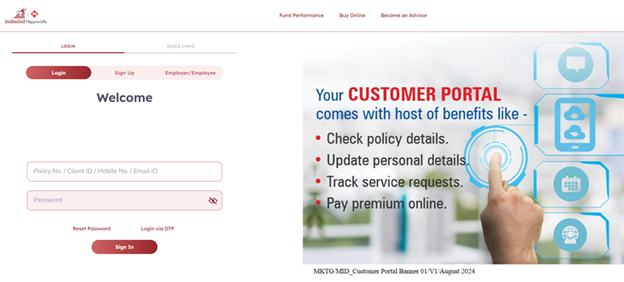
Login Using OTP (One-Time Password)
If you prefer not to remember a password, the portal supports OTP-based login linked to your registered mobile number. On the login screen, look for the OTP login option, enter your registered mobile number and use the OTP delivered via SMS to authenticate.
Corporate / Group Policy Login
Employees covered under a group policy must use a separate portal: https://groupcustomer.reliancenipponlife.com/GroupRegistration/LoginPage.aspx
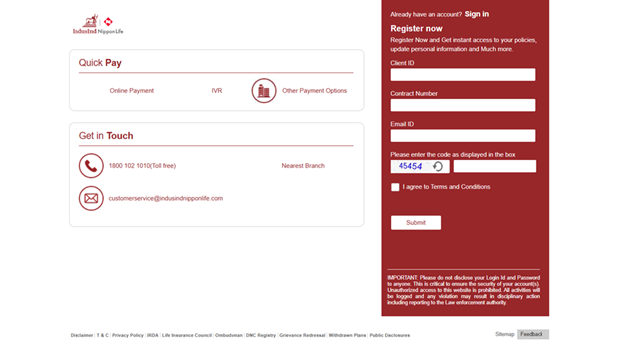
This is the dedicated group customer portal for corporate policyholders and not the individual customer portal.
|
Login Type |
URL / Method |
Who It's For |
|
Individual Customer Portal |
Individual policyholders |
|
|
Email + Password |
Standard login on the portal |
Registered users |
|
OTP Login |
Via registered mobile number |
Users who prefer passwordless access |
|
Corporate Group Portal |
https://groupcustomer.reliancenipponlife.com/GroupRegistration/LoginPage.aspx |
Group / employer-covered policyholders |
|
Mobile App Login |
INL Customer Connect App (Android / iOS) |
Users preferring app-based access |
Note: Always log in from your registered email ID and registered mobile number. Using unregistered contact details will result in authentication failure.
If you bought a policy but haven't created an online account yet, registering is a one-time process. Keep your policy number and registered mobile number handy before you begin.
Step-by-Step Registration Process
Step 1: Go to https://www.indusindnipponlife.com/login
Step 2: On the login page, click "Create Account" (visible below the Sign In button).
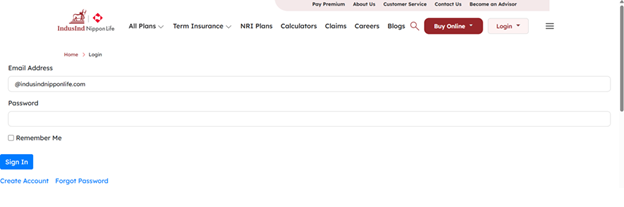
Step 3: You will be prompted to enter your Policy Number and Date of Birth, or your registered mobile number — these are used to verify your identity against INLIC's policy records.
Step 4: An OTP will be sent to your registered mobile number. Enter it to verify your identity.
Step 5: Set a new password. Choose a strong password with a mix of uppercase, lowercase, numbers and special characters.
Step 6: Provide your email address (if not already on record) and confirm it.
Step 7: Click Submit. Your account is now active. You can log in immediately using your email and new password.
What you'll need:
Note: If your mobile number has changed since the policy was issued, you will need to update it at a branch or via customer care before you can complete self-registration online.
A forgotten password is the most common reason people can't access their account. The portal has a self-service reset option. This means you don't need to call customer care for this.
Step-by-Step Password Reset
Step 1: Go to https://www.indusindnipponlife.com/login
Step 2: Click "Forgot Password" and it's directly below the Sign In button on the login page.
Step 3: Enter your registered Email Address.
Step 4: You will receive a password reset link on your registered email, or an OTP on your registered mobile number (depending on the portal's current verification flow).
Step 5: Click the reset link (valid for a limited time, typically 15–30 minutes) or enter the OTP.
Step 6: Set a new password. Confirm it and click Submit.
Step 7: You'll be redirected to the login page. Log in with your new password.
If you no longer have access to your registered email or mobile number, you'll need to contact customer care at 1800 102 1010 (toll-free) to update your contact details before resetting the password.
Note: For security reasons, password reset links expire quickly. If the link has expired, simply initiate the reset process again from the login page.
Logging into the portal isn't just about paying premiums online. The portal is a full-service account dashboard that reduces the need to ever visit a branch for routine requests.
|
Feature |
What You Can Do |
|
Premium Payment |
Pay renewal premiums online via net banking, UPI, debit/credit card |
|
Policy Statement |
Download premium receipts and policy account statements |
|
Fund Value Check |
Track ULIP fund performance and NAV in real time |
|
Service Requests |
Submit change-of-address, nominee update and contact detail change requests |
|
Claims Initiation |
Initiate and track claim status online |
|
Policy Documents |
Download soft copies of your policy bond and terms |
|
Renewal Reminders |
Get due-date alerts directly to registered email/mobile |
Note: The exact features available may vary based on your plan type (term, ULIP, savings, group). Some requests like nominee changes may still require physical documentation as per IRDAI guidelines.
There's also the INL Customer Connect App, available on Android (Google Play) and iOS (Apple App Store). The mobile app offers most key features available on the customer portal, with additional conveniences such as biometric login.
Choosing the right channel depends on what you need to do.
|
Channel |
Best For |
Access Link / Number |
|
Customer Portal (Web) |
Detailed policy management, document downloads |
|
|
INL Customer Connect App |
On-the-go access, biometric login |
Play Store / App Store (search: INLIC Customer Connect) |
|
WhatsApp chatbot (+91 72088 52700) |
INLIC's 24×7 digital assistant for policy queries, premium payment guidance and basic service requests |
Send 'Hi' to start |
|
Toll-Free Call |
Complex issues, password help without email access |
1800 102 1010 |
|
|
Formal requests, complaints |
customerservice@indusindnipponlife.com |
Note: The WhatsApp assistant operates 24×7. For account-sensitive actions like fund switches or nominee changes, the portal or a branch visit is recommended.
Not yet covered or looking to buy life insurance? Here's a quick check.
If you're still evaluating life insurance options and haven't decided on a plan, comparing policies across multiple insurers can save you lakhs over a policy's lifetime. Visit SMC Insurance to compare plans from leading insurers and get personalised guidance before you commit.
The portal solves most self-service needs. For anything that requires human intervention like a claim query, a policy revival request, or a dispute, here's the complete breakdown of support channels.
|
Support Channel |
Contact |
Hours |
|
Toll-Free (General) |
1800 102 1010 |
Mon–Sat, 8 AM–8 PM |
|
Claims Helpline |
1800 102 3330 |
Mon–Sat, 8 AM–8 PM |
|
NRI Support |
+91 022-4198-4000 |
Business hours |
|
|
customerservice@indusindnipponlife.com |
24×7 (response during business hours) |
|
WhatsApp Chatbot |
+91 72088 52700 |
24×7 |
|
Corporate Office Phone |
+91 22 6896 5000 |
Business hours |
|
Branch |
Branch Locator link |
Branch-specific timings |
|
Grievance Portal |
https://www.indusindnipponlife.com/grievance-redressal |
Online, 24×7 |
|
IRDAI Bima Bharosa |
bimabharosa.irdai.gov.in |
Online, 24×7 |
Note: For all calls and emails, use your registered phone number and email ID. Unregistered contact details may delay identity verification and resolution.
Once you're logged in, the portal does the heavy lifting. Here's what to expect and how to use each section effectively.
Payments are generally processed promptly, though update timelines may vary depending on the payment method and banking systems. There's no lag, no manual reconciliation.
Digital convenience comes with responsibility. A few non-negotiable habits will keep your account and personal data safe.
These aren't complicated steps. They're basic hygiene that significantly reduces the risk of account compromise.
The IndusInd Nippon Life Insurance login portal is where your policy truly comes alive. Paying premiums, tracking fund values, downloading statements, submitting service requests, etc., are all accessible without stepping into a branch or waiting on hold. The process to get in is simple: visit the customer portal, use your registered email and password (or OTP) and if you're new, create an account in under five minutes using your policy number.
If something goes wrong or needs human attention, the support infrastructure is solid with a toll-free number from 8 AM to 8 PM on weekdays and Saturdays, a 24×7 WhatsApp assistant, email support and a formal grievance portal that escalates to IRDAI if needed. The INLIC mobile app mirrors all portal features and adds the convenience of biometric access.
Disclaimer:The information provided on this platform is intended for general awareness and educational purposes. While every effort is made to ensure accuracy, some details may change with policy updates, regulatory revisions, or insurer-specific modifications. Readers should verify current terms and conditions directly with relevant insurers or through professional consultation before making any decision.
All views and analyses presented are based on publicly available data, internal research, and other sources considered reliable at the time of writing. These do not constitute professional advice, recommendations, or guarantees of any product’s performance. Readers are encouraged to assess the information independently and seek qualified guidance suited to their individual requirements. Customers are advised to review official sales brochures, policy documents, and disclosures before proceeding with any purchase or commitment.
The direct URL is https://customer.indusindnipponlife.com/customer/. You can also access it from the main website www.indusindnipponlife.com by clicking "Login" in the top navigation and selecting "Customer Portal." The portal is accessible on both desktop browsers and mobile browsers. For a dedicated app experience, download the INL Customer Connect App from the Google Play Store or Apple App Store. Bookmarking the direct URL avoids the extra navigation steps each time.
On the login page (www.indusindnipponlife.com/login), click "Create Account." You'll be asked to verify your identity using your policy number and date of birth. An OTP will be sent to your registered mobile number. Once verified, set a password and provide your email address. The whole process takes under five minutes. If your mobile number has changed since the policy was issued, you'll need to update it at a branch or via customer care before online self-registration is possible.
Yes, INLIC offers a quick-pay option at https://www.indusindnipponlife.com/pay-premium that allows premium payment using your policy number without requiring a portal login. That said, logging in gives you payment history, receipts and premium due-date alerts — features not available in the guest pay flow. For recurring payments, the portal also lets you set up auto-debit or renewal reminders.
Yes, the portal is accessible from outside India. NRI policyholders can log in using the same customer portal URL and credentials. For support, there is a dedicated NRI helpline at +91 022-4198-4000. INLIC also offers specific NRI insurance plans under term, savings and ULIP categories. If OTP delivery is delayed to international numbers, contacting customer care in advance to update your contact details can prevent login issues.
First, confirm that browser cookies are enabled as the portal requires cookies for session authentication (the error message explicitly states this). Clear your browser cache and try again. Ensure you're using the registered email address (not an alternate one) and that Caps Lock is off. If OTP login fails, check network connectivity. Persistent login failures despite correct credentials should be reported to the toll-free number 1800 102 1010 (Monday to Saturday, 8 AM to 8 PM). Do not attempt repeated logins in quick succession as that can temporarily lock the account.
Group policyholders (typically employees covered under an employer-provided insurance scheme) must use the separate corporate portal at https://groupcustomer.reliancenipponlife.com/GroupRegistration/LoginPage.aspx. This is distinct from the individual customer portal. Login credentials for the group portal are usually provided by the employer's HR team or plan administrator, not generated independently by the employee. Contact your HR department if you haven't received your login details.
The portal gives policyholders access to premium payment, premium receipts, policy statements, ULIP fund value and NAV tracking, claims initiation and tracking, service requests (address change, nominee update, contact detail update) and policy document downloads. The INL Customer Connect mobile app replicates these features with biometric login support. Note that some requests such as nominee changes, may require physical documentation per IRDAI regulations, even if initiated online.
Start with the formal grievance portal at www.indusindnipponlife.com/grievance-redressal. If the resolution is unsatisfactory or delayed beyond the prescribed turnaround (INLIC publishes its Customer Service TAT on the website), you can escalate to IRDAI's integrated platform Bima Bharosa at bimabharosa.irdai.gov.in, or approach the Insurance Ombudsman at www.cioins.co.in/ombudsman. IRDAI mandates that insurers resolve complaints within defined timelines; escalating to these external bodies triggers regulatory oversight, which typically accelerates resolution.


SMC Insurance Brokers Pvt. Ltd.
SMC Metro Mall, Near Pratap Nagar Metro Station, Pratap Nagar, New Delhi-110007
Registration No: 289, Registration Code No: IRDAI/DB-272/04/289, Valid till: 27/01/2029, License category: Composite Broker, CIN: U66000DL1995PTC172311
Insurance is the subject matter of solicitation.
Visitors are hereby informed that their information submitted on the website may be shared with insurers.
Product information is authentic and solely based on the information received from the Insurer.

Scan to Download
SMC Insurance App
