


SMC Insurance
Welcome to SMC.
How may I assist you?

Time Remaining to Avail Tax Benefits
(Under section 80C & 80D)
Get 90 Lakh Health Cover at Just ₹2K


Buy Life Insurance Now!
Enter any vehicle registration number to get complete RTO details in seconds.
Type your vehicle number in the search box above
Live data fetched from Parivahan/VAHAN database
Owner info, insurance status, RC validity and more
Name, address & ownership
Date, expiry & RTO office
Policy status & expiry
Make, model, fuel type
Registration certificate dates
Vehicle Details
Important Dates
Other Information
A number plate can feel like a tiny name tag with personality, quietly telling a story while the car goes about its day. We spot these plates on busy streets, in parking lots, outside our homes, and sometimes a small question pops up about vehicle owner details by number plate. Who owns that car? How old is that bike? Could those details help before making a deal on a used vehicle or after a light bump on the road?
Checking RTO vehicle details by registration number turns that curiosity into something practical. It helps you see simple facts like make, model, fuel type, and year of registration in a neat and clear way. How might this help you avoid surprise repairs? Or give you confidence before saying yes to a seller? For many people, this little step feels like asking for a quick introduction before trusting a vehicle’s past.
The process feels straightforward, useful in daily life, and friendly to anyone who likes staying informed. Want to explore how to check these details with ease and use them wisely? Know more in the article below.
When you look up RTO vehicle details, you are basically pulling information from the official records maintained by the Regional Transport Office. Every vehicle that runs on Indian roads is registered here. And the data stored in these records helps identify the vehicle, trace its ownership history, and confirm whether it is legally compliant.
People usually check these details when buying a used car or bike. Some want to verify insurance and RC status. Others simply want to confirm if the RTO vehicle information shared by a seller is genuine.
When you enter a vehicle’s registration number on an official platform like the Parivahan vehicle details portal, you get details that come straight from the government’s RTO records. So, they’re accurate and current. Here’s what you can typically find:
|
Vehicle make and model |
You see the brand and specific model of the car or bike registered to that number. |
|
Fuel type (Petrol / Diesel / Electric / CNG) |
This shows what fuel the vehicle uses, which matters for costs, emissions, and some insurance rules. |
|
Registration date |
You’ll know exactly when the vehicle was first registered. It helps estimate age and resale value. |
|
RTO name and location |
The record lists which RTO office handled the registration, including its city or state. |
|
RC status |
You can see if the Registration Certificate is active, expired, or under some pending status. |
|
Insurance expiry date |
The system often shows the current insurance validity, so you know if cover is live or due for renewal. |
|
Hypothecation/loan details |
If a vehicle is financed and still under loan, some records flag the hypothecation status. That’s useful when buying a used vehicle. |
|
PUC status (if available) |
Some checks include Pollution Under Control certificate validity, showing if the vehicle meets emission norms. |
Note: All details are sourced from official government vehicle records.
Checking vehicle details online is easier than most people think. You just need the registration number. Official portals like VAHAN’s Parivahan site let you check directly with the government database. And there are trusted aggregator tools like VahanX and CarInfo that make the experience smoother with a cleaner interface and extra help if you’re uncertain. Here’s how it works step by step:
You might think “Why would I ever need this?” But the truth is, lots of people benefit from checking vehicle details online.
Do this before you sign anything. You’ll avoid surprises about age, insurance status, or loans tied to the vehicle. It’s one of the smartest first steps you can take.
Sharing a clear RTO check builds trust. It shows you’re transparent and confident about the vehicle’s history.
Your insurer at SMC Insurance may ask for accurate vehicle details. Checking first helps you avoid mistakes in your policy. It makes quotes quicker and more reliable.
You deal with many vehicles every day. Instant access to RTO info speeds up paperwork and reduces back-and-forth.
Maybe you’re curious about your own bike or car. Even that small check can confirm your RC, insurance, and fuel type in a few clicks.
If you prefer using a computer, the Parivahan Sewa website is one of the most reliable ways to check vehicle owner details. It connects directly to the national VAHAN database, which means the results you see are drawn from official RTO records. And once you know where to look, the process feels quite straightforward. Here’s how you can check the details step by step:
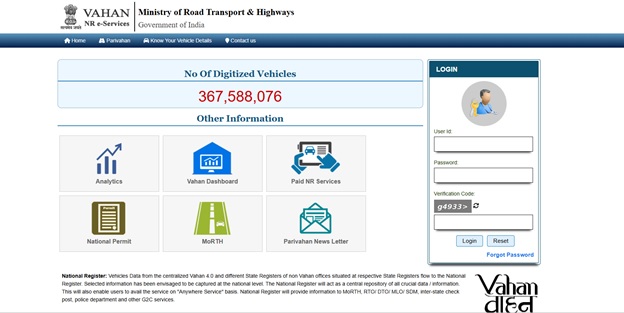
Many people use this before buying a used car or bike. And, it often becomes the first checkpoint before they move ahead with insurance quotes or transfers, because it gives them clarity about the vehicle’s background.
Some people find it more convenient to check vehicle details on their phone. The Parivahan Sewa mobile app makes that possible on the go, especially if you’re at a dealership, meeting a seller, or just want to verify something quickly. Here’s how you can use the app to view vehicle owner details:
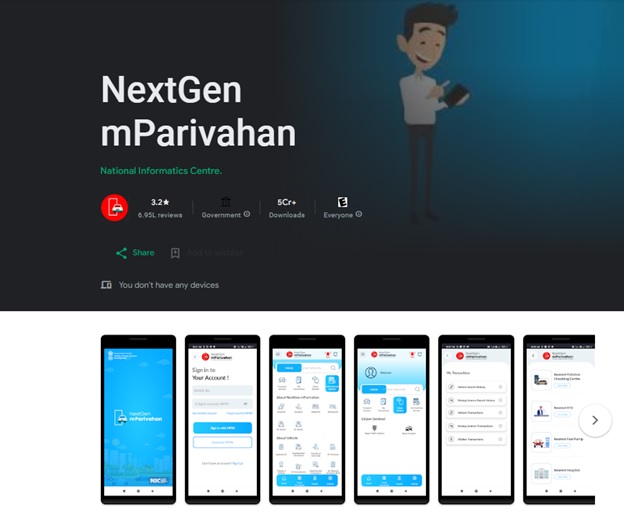
The mobile app is especially handy for brokers, dealers, and individuals who handle multiple vehicles or documents in a day.
If you’re already exploring insurance or comparing plans, it often feels easier to check your vehicle details right where you’re managing everything else. That’s why we’ve made it simple to look up key RTO information through the SMC Insurance platform itself. And the process hardly takes a minute.
You don’t need to dig through multiple portals or switch between tabs. Just enter your number, hit search, and the details appear instantly. Here’s how you can do it:
Many of our users check these details first, then continue to explore policy options from our partner insurers with better clarity. And if you’re buying a used vehicle or updating an existing policy, this quick lookup can save a lot of guesswork and confusion.
If you prefer doing everything on your phone, the SMC mobile app Android version/IOS version makes it even smoother. You can check vehicle details, review your policy, compare plans, and manage your insurance journey from one place. And you can do it anytime, whether you’re at home or standing next to the vehicle you’re verifying.
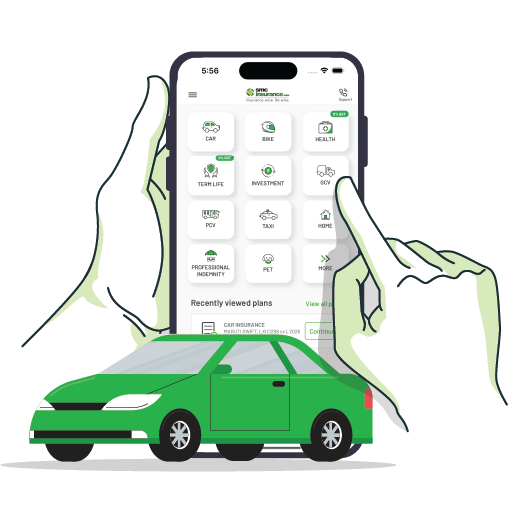
Want more smart ways to simplify your Vehicle Insurance journey?
The SMC Insurance app gives you expert guidance on everything INSURANCE


Sometimes people only want to confirm whether a vehicle has a valid insurance policy, especially after an accident or when they’re checking a pre-owned car or bike. That’s where the Insurance Information Bureau (IIB) portal becomes useful. It pulls insurance-related records from insurers that report data to the central system. Here’s how you can check vehicle owner and insurance-related details through the IIB portal:
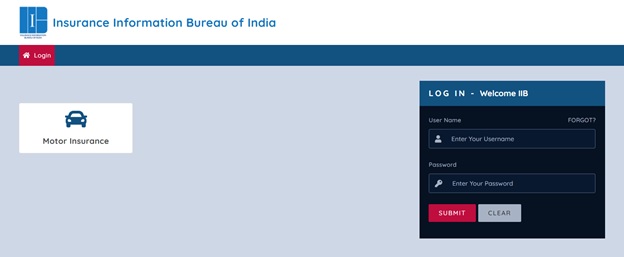
People often use this when they need to trace insurance details after a hit-and-run case, or when they want to cross-verify policy information before renewal.
There are times when you may not have internet access, but still need to check basic vehicle details. Maybe you’re on the road, or your network is patchy. In such situations, the SMS service can be helpful. It gives you quick, essential information straight on your phone. Here’s how you can do it:
Type the message in this format:
VAHAN <space> VEHICLE REGISTRATION NUMBER
Example: VAHAN MH01AB1234
The SMS service usually provides limited but useful information. It’s handy when you simply want quick verification or a basic confirmation without logging into a website or app. And once you have these details, you can always revisit the Parivahan portal or the SMC Insurance platform to check deeper records or continue with insurance-related steps.
Built for speed. Designed for trust. Check a vehicle like a pro:
Simple, fast and transparent - just the way vehicle information should be!
Note: You can check owner and RTO details for cars, bikes, scooters, commercial vehicles and other registered vehicles in India using the vehicle registration number.
A lot of people worry about privacy when they look up vehicle details online, and that’s fair. Nobody wants their personal data floating around the internet. The good thing is that platforms like the VAHAN portal and trusted tools built around it only show limited information that relates to the vehicle record, not sensitive personal data.
These details exist to help verify authenticity, prevent fraud, and support legal or insurance-related checks. And since the data comes from official government databases, the system is designed to maintain security and compliance.
When you use platforms like SMC Insurance to check vehicle details, the process stays even more privacy-friendly. You don’t need to log in or share your mobile number, and your search isn’t stored or reused. You simply enter the registration number, view the details, and move ahead if you need to. So yes, checking vehicle details online is generally safe, especially when done through verified and transparent platforms that keep user privacy at the core.
Vehicle details may look like simple records at first, but they play a big role when it comes to insurance. And once you see how everything connects, the process starts making a lot more sense.
When you check the RTO record, you get clarity on things like the vehicle’s age, fuel type, registration status, and whether there’s an active policy already linked to it. This helps avoid mistakes while buying or renewing insurance, because even a small mismatch in details can affect the premium or future claims.
If you’re buying a used car or bike, these details become even more important. They help you confirm whether the vehicle still has an ongoing loan, whether the RC status is active, and if the previous policy has expired. And that gives you a clearer picture before you choose your next insurance plan.
Checking RTO vehicle details by registration number gives you quick clarity about a vehicle without guesswork or long processes. And whether you’re buying a used car, renewing insurance, or just confirming records, this small step makes every decision easier and more confident. With tools that pull information from official databases and keep privacy in mind, you get what matters most like accurate details, clean access, and a smooth experience from start to finish.
Disclaimer: The information provided on this platform is intended for general awareness and educational purposes. While every effort is made to ensure accuracy, some details may change with policy updates, regulatory revisions, or insurer-specific modifications. Readers should verify current terms and conditions directly with relevant insurers or through professional consultation before making any decision.
All views and analyses presented are based on publicly available data, internal research, and other sources considered reliable at the time of writing. These do not constitute professional advice, recommendations, or guarantees of any product’s performance. Readers are encouraged to assess the information independently and seek qualified guidance suited to their individual requirements. Customers are advised to review official sales brochures, policy documents, and disclosures before proceeding with any purchase or commitment.
Enter the vehicle registration number in a trusted tool or the Parivahan/VAHAN portal, submit it, and you’ll see the available RTO records linked to that vehicle.
Yes, the details are sourced from official government RTO and VAHAN records, which makes them reliable for verification and reference.
Yes, it’s generally safe when you use verified platforms. Only limited, non-sensitive vehicle information is shown, and privacy-focused tools do not store your search data.
No, you can check vehicle details using just the registration number on platforms that don’t require login or OTP.
Yes, you can check details for both two-wheelers and four-wheelers using the registration number.
You can usually see make and model, fuel type, registration date, RC status, RTO office, insurance validity, hypothecation details, and PUC status (if available).
Yes, most platforms let you view basic vehicle details for free.
Yes, the insurance validity or expiry date is often shown if it’s available in the VAHAN database.
You should contact your respective RTO and request an update or correction in the official records.
No, to protect privacy, complete owner names are not displayed in public lookup tools.
Updates depend on when records are submitted by RTOs and insurers to the central database, so refresh frequency may vary.
Yes, most states and Union Territories registered under the VAHAN system are supported.
Yes, if the information is recorded in the database, the tool will display PUC status and insurance validity.
Yes, once your vehicle details are verified, you can use them to compare and buy motor insurance plans from partner insurers on platforms like SMC Insurance.
SMC Insurance Brokers Pvt. Ltd.
SMC Metro Mall, Near Pratap Nagar Metro Station, Pratap Nagar, New Delhi-110007
Registration No: 289, Registration Code No: IRDAI/DB-272/04/289, Valid till: 27/01/2029, License category: Composite Broker, CIN: U66000DL1995PTC172311
Insurance is the subject matter of solicitation.
Visitors are hereby informed that their information submitted on the website may be shared with insurers.
Product information is authentic and solely based on the information received from the Insurer.

Scan to Download
SMC Insurance App
