



How to Pay LIC Premium Online without Login
You can pay your LIC premium without signing in using the Pay Direct (Without Login) option on the official LIC website:
- Go to LIC website - Premium Payment - Pay Premium Online - Pay Direct
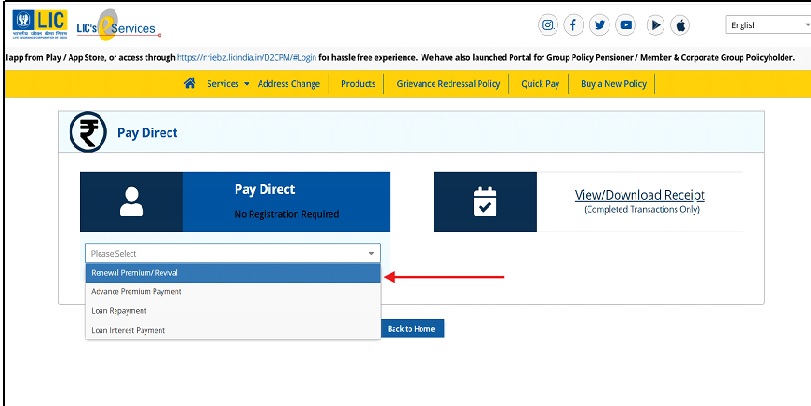
- Select Renewal Premium / Revival / Advance Premium / Loan Repayment
- Enter prompted details, review premium details and proceed to payment
- Pay using UPI, net banking, debit card, credit card, or Bharat QR
- Download the e-receipt or check it later under View Transaction Status
Key points
- Works for one-time or quick payments
- Receipt is sent to the entered mobile/email
- UPI, net banking, debit card, and QR usually have no extra charges
- Credit card payments may have a convenience fee as per LIC policy
Raj had just kicked off his shoes and sank into the couch after a long, exhausting day. His favourite show was about to start—the perfect way to unwind. With one hand reaching for the remote, he absentmindedly scrolled through his phone in the other. That’s when a LinkedIn post caught his eye- LIC premium payment online without login!
It was like the whole universe was giving him hints- his premiums were still due! He sighed, knowing he had been procrastinating for days just to avoid the login struggle. Signing in itself was a huge chore. He couldn't seem to remember what his password was. He could reset it, but that would be time-consuming. Maybe he could do it tomorrow? What if he forgot again? After all, a lapsed policy is not something easy to deal with.
Ever found yourself in a similar situation?
You know you need to pay, but the process feels like a hassle. The good news? LIC has made it easier! LIC’s official Pay Direct (Without Login) option allows premium payments online without signing in to a portal or registered account.
Sounds convenient, right?
Let’s dive into how it works and why it’s a game-changer for individuals like Raj—and maybe for you too.
About The Insurer: Life Insurance Corporation Of India
Life Insurance Corporation of India, known in Indian homes since 1956, is owned by the Government of India and has headquarters in Mumbai. It has insured millions of people and secured their financial future. Mr. Siddhartha Mohanty is the chairman.
Even if you are an old or a new customer, understanding how to efficiently manage your policy can save your precious time and energy.
But first things first, let’s delve into the basics of premium payments!
LIC Premium Payment Online
Raj’s anxiety soon turned to relief when he discovered that LIC allows premium payments without requiring a login. LIC offers customers a convenient way to pay premiums online, eliminating the need to log into their accounts.
To maintain uninterrupted coverage, timely premium payments are crucial. LIC has simplified this process by offering an easy, no-login payment option. Let’s walk through how it works so you can experience the same relief Raj did.
LIC Premium Payment Online Without Login: Step-By-Step Process
LIC Premium Payment is quick and hassle-free, even without logging in. Just follow these steps:
Step 1: Visit the LIC Website
Head over to the official LIC website.
Step 2: Select "Pay Premium"
Go to the homepage, search for, and then click on the "Premium Payment" option and then click on “Pay Premium Online” which takes you to the page "Pay Direct (Without Login)".
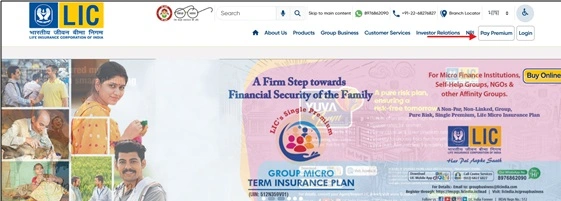
Step 3: Select "Renewal Premium / Revival"
You will be taken to the "Pay Direct" page. From the dropdown menu, select "Renewal Premium / Revival" as indicated below.
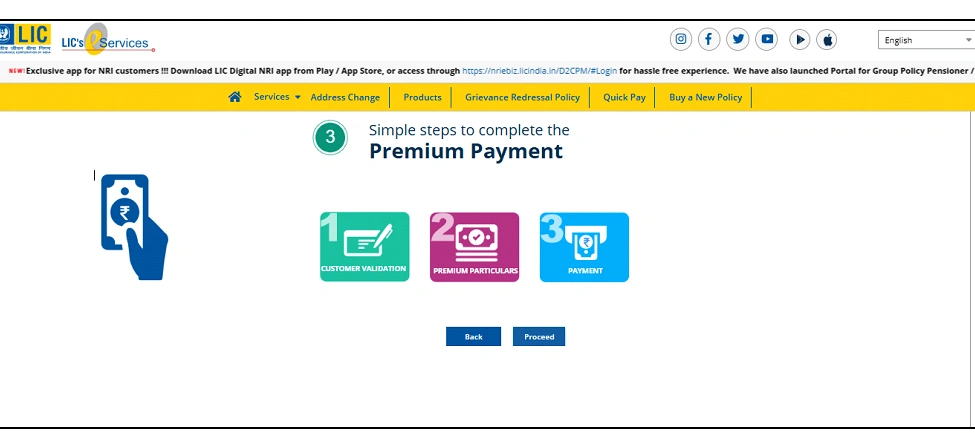
Step 4: Customer Validation Process
The premium payment process is quick and easy, consisting of three simple steps:
- Customer Verification
- Premium Details
- Payment
Step 5: Proceed Further
The next step is to click on "Proceed" to initiate the customer validation process.
Step 6: Review Premium Details
To complete the customer validation process, give the following information:
- Policy number
- Mobile number (Provide your current mobile/email to receive e‑receipt)
- Date of birth
- Email ID
Step 7: Confirm and Proceed
Click on “I Agree," then select “Submit” to move forward.
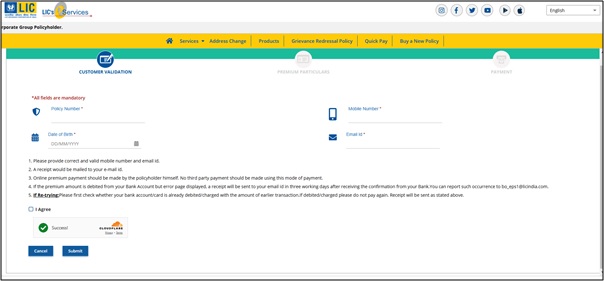
Step 8: Review Premium Details
The total premium amount due will be displayed on the screen. After you have reviewed the premium details, follow the prompts provided on the screen.
Step 9: Select Your Payment Option
Select your desired payment method. LIC has options like UPI, Net‑Banking, Debit Card, Credit Card, Bharat QR. There are no additional charges for UPI, net‑banking, debit, Bharat QR. However, credit cards incur a convenience fee paid by LIC. LIC has introduced a WhatsApp bot at +91-8976862090 that lets registered portal users check due policies and pay premiums using UPI, net banking, or cards via chat. This WhatsApp service requires prior registration on the LIC customer portal and is separate from the Pay Direct option. Continue with the payment through the selected method.
Step 10: Download Your Receipt
After payment, you can download the receipt immediately. You can also view or download it later under “View Transaction Status” on the Pay Direct page by entering your policy number and transaction details. For registered portal users, the same option is available in the portal under “Basic Services” and then “Online Payment Receipts”.
Important Points to Keep in Mind
- Your mobile number and email must be correct, as payment confirmation and e-receipts may be sent through these channels.
- Anyone with correct policy details (policy number, date of birth, mobile number) can pay the premium via Pay Direct. It is not restricted only to the policyholder.
- If the amount is debited but an error occurs, a receipt will be sent to your email within 48 hours, once you receive confirmation from your bank. For issues, contact bo_eps1@licindia.com.
- Before retrying, check whether your account has already been debited to avoid duplicate payments.
Unlock The Benefits Of LIC Premium Payment Online Without Login
Still unsure if this method is for you? Let’s look at some key benefits:
- Convenience: Payment of premiums without logging in saves time and effort, making it faster and easier for those who are not registered on the portal.
- Accessibility: There is no requirement to remember login details or make an account; it is suitable for individuals who need to make one-time payments.
- Security: All payments go through LIC’s official platform and secure gateway, ensuring encryption and protection of personal data.
- Time-Saving: The online payment system is quick and easy, offering an alternative to other methods like cheques or cash payments.
- Flexibility: It provides multiple payment methods such as credit and debit cards (Visa/Master/Rupay), net banking, UPI, Bharat QR Code, etc., and allows you to choose the best method according to your preference.
- Grace periods:LIC provides a grace period of 30 days for annual/half-yearly/quarterly premium payments and 15 days for the monthly frequency. Pay‑Direct allows revival within this period, including revival window plus late fee if lapsed.
Important Considerations
While Raj’s experience was smooth, here are a few things to watch out for:
- Verify Policy Information: Double-check that your policy number and personal details are accurate. Incorrect information could lead to payment issues.
- Payment Limits: Be aware of transaction limits for your chosen payment method. Ensure your payment falls within these limits to avoid complications.
- Save Your Receipt: Always keep a copy of your payment receipt. It serves as proof of payment and may be useful for future reference.
Must-Read Guides From SMC:
Wrapping It Up!
Life is hectic, and due dates can be forgotten, but missing a premium payment from LIC is out of the question. With no login payment at LIC, you can settle your premium in just a few minutes, just like Raj did. The next time you are in a hurry, use this easy way and ensure that your policy stays active. Secure your future as well as your family’s future with just a few clicks, and enjoy the peace of mind of uninterrupted coverage!
Disclaimer:The information provided on this platform is intended for general awareness and educational purposes. While every effort is made to ensure accuracy, some details may change with policy updates, regulatory revisions, or insurer-specific modifications. Readers should verify current terms and conditions directly with relevant insurers or through professional consultation before making any decision.
All views and analyses presented are based on publicly available data, internal research, and other sources considered reliable at the time of writing. These do not constitute professional advice, recommendations, or guarantees of any product’s performance. Readers are encouraged to assess the information independently and seek qualified guidance suited to their individual requirements. Customers are advised to review official sales brochures, policy documents, and disclosures before proceeding with any purchase or commitment.


