 Life Insurance
 Health Insurance
 Investment
 Car Insurance
 Bike Insurance
 GCV Insurance
 PCV Insurance
 Taxi Insurance


SMC Insurance
Welcome to SMC.
How may I assist you?

Time Remaining to Avail Tax Benefits
(Under section 80C & 80D)
Get 90 Lakh Health Cover at Just ₹2K


Buy Life Insurance Now!
The Bajaj Life Insurance Login Customer Portal allows policyholders to manage their life insurance online. You can log in using your mobile number or user ID, view policy details, pay premiums, download documents and track claims.
After the recent rebranding by Bajaj Finserv, the portal continues to function with the same structure, though branding and interfaces may gradually update. Most actions take under 5 minutes once logged in and payments reflect instantly in most cases.
A missed premium, a forgotten password, or worse, a claim update that never seems to arrive. These are not rare situations. Many policyholders in India still depend on agents or branch visits for simple updates. That costs time and sometimes, peace of mind. A delayed renewal can even lead to policy lapse, which means losing coverage that may have taken years to build.
Here’s the shift. With the Bajaj Life Insurance Company, most of these tasks now take minutes instead of days. You log in, check your policy, pay dues and track claims without calling anyone. This guide breaks down exactly how the portal works, what has changed after the rebranding and how to use it without confusion.
Here’s where many users get confused. In 2025, Bajaj Finserv announced a restructuring and rebranding of its insurance businesses. As reported by Economic Times and The Hindu, the life and general insurance arms were repositioned under updated brand identities to simplify structure and strengthen independent positioning.
The short answer is simple. The services did not stop or reset.
Think of it like a bank changing its logo. Your account doesn’t disappear. That said, you may notice:
If you’re searching for Bajaj Life Insurance Login, you are still in the right place.
Let’s simplify this before going into steps. The portal acts as a control panel for your policy. Once logged in, you can:
Here’s what most people miss. The portal is meant for regular use, even if everything is going fine.
Let’s walk through it exactly as it works.
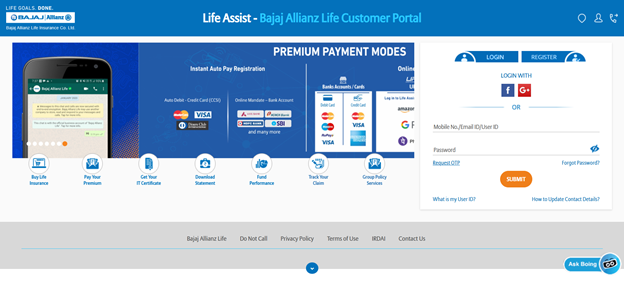
If you’ve just bought a policy or never logged in before, this is where you begin. The process is straightforward, but small mistakes can slow things down. Let’s walk through it carefully.
Step 1: Open the Official Login Page
Go to the official Bajaj Life Insurance login page. You’ll see options for existing users and new users.
Look for: “New User” / “Register” / “Sign Up” and click that to begin.
Step 2: Enter Your Policy Details
This is where the system identifies you. You’ll typically be asked to enter:
Enter details exactly as per your policy.
Step 3: Verify Your Identity Using OTP
Once details are submitted, an OTP is sent to your registered mobile number. Sometimes also to your email. Enter the OTP within the given time window (usually 30–120 seconds). If it expires, request a new one.
Step 4: Create Your Login Credentials
After OTP verification, you’ll be asked to set your password. The password must be of
Always make it a point to avoid simple passwords like your name, birthdate, “123456”, etc. This step matters more than people think. Weak passwords often lead to account lockouts later.
Step 5: Confirm and Complete Registration
Once credentials are set you’ll see a confirmation message and your account is now active. Some users also receive:
Step 6: Log in for the First Time
Go back to the login page and enter your mobile number or user ID. Use the password you just created and complete OTP verification if required. You’ll now land on your dashboard.
This happens more often than people admit.
Step 1: Go to the Official Login Page
Open the Bajaj Life Insurance login page. Below the login fields, you’ll see the option:
“Forgot Password?”
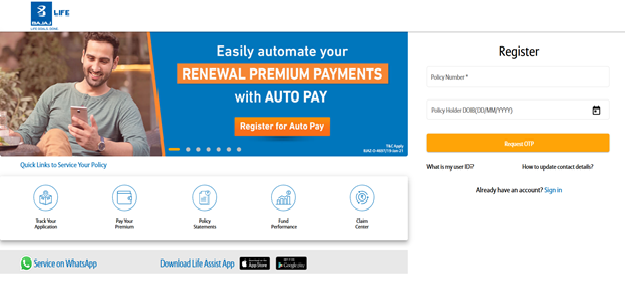 Click on it to begin.
Step 2: Enter Your Registered Details
You’ll be asked to identify your account. Enter any one or more of the following:
Make sure the details match exactly with what you used while purchasing the policy.
Step 3: Request OTP for Verification
Once you submit your details:
Step 4: Enter OTP and Verify Identity
Type the OTP carefully within the time limit (usually 30–120 seconds). If it expires, click “Resend OTP”. Avoid requesting multiple OTPs quickly, as this may temporarily block the request
Step 5: Set a New Password
After successful verification, you’ll be asked to create a new password. Try not to reuse your old password. Many systems will reject it anyway.
Step 6: Confirm and Save
Re-enter the password to confirm. Once accepted, you’ll see a confirmation message. Some users receive SMS or email confirmation. This means your password is now updated.
Most buyers either overpay or underinsure without realising it. You can check options and get clarity here at SMC Insurance
Here’s a quick way to decide.
If you rarely log in, start with the portal first.
91-7888013595 / 022 6124 1800
Available daily, typically between 9:00 AM and 7:00 PM (IST)
020 6712 1005
Usually active Monday to Saturday, 9:00 AM to 7:00 PM (IST)
These are the main helplines listed on official customer service pages and remain the fastest way to reach a human agent.
These are not toll-free, so call charges may apply depending on your plan.
It works well for quick queries but may redirect you to call support for complex issues.
Best practice: Always cross-check the latest email on the official website before sending sensitive documents.
One Common Mistake to Avoid: People often call the new policy number for existing policy issues. That leads to transfers and longer wait times.
Managing life insurance should not feel heavy or time-consuming. With the Bajaj Life Insurance login portal and mobile app, it really does not have to be. These tools are built to fit into everyday life, whether you check your policy often or only once in a while.
Once you log in, things feel clear. You know where to look. And you know what to do next.
➔Your Dashboard
The moment you sign in, you land on your dashboard. This is where everything comes together. Think of it as a single screen that tells you the full story of your policy.
You can see your policy details, premium history, upcoming payments and service options all in one place. You can check your coverage status, track a claim, or raise a request without stepping away from your routine.
Need to update a nominee or change PAN details? That too happens right here, in a few simple steps. The dashboard keeps your insurance organised and easy to manage, without making it feel technical.
➔How to Manage Your Policies?
Looking after your insurance does not need long hours or repeated follow-ups. The portal is designed to save time and reduce effort. Here is what you can do once logged in.
Everything is laid out to help you stay in control of your coverage.
➔Make Premium Payments
Paying your premium does not need planning or reminders scribbled somewhere. The Bajaj Life Insurance portal keeps it straightforward and quick, much like paying for anything else online.
Here is how you can do it without fuss:
That is it. Simple, secure and done in minutes.
➔Streamlined Claims Management
Filing a claim is already an emotional moment. The process itself should not add to the weight. The Bajaj Life Insurance portal keeps claims handling clean and manageable.
You can submit a claim online, upload the required documents and track progress without visiting a branch. Updates are shared in real time, so you always know where things stand. There is no paperwork to carry around and no repeated follow-ups. Whether it is for you or a family member, online claims management keeps the process calm and clear.
➔The Power of the Mobile App
If your phone handles most of your daily tasks, the Bajaj Life Insurance mobile app fits right in. Available on both Android and iOS, it lets you manage your insurance wherever you are.
Here is what the app allows you to do:
Together, the portal and mobile app make insurance feel less like a task and more like something you quietly stay on top of.
Digital access makes life easier. A few small habits make sure it stays safe too. When you use the customer portal, these simple steps go a long way in protecting your information.
When it comes to long-term financial planning and protecting loved ones, Bajaj Life Insurance has built a strong name over the years. Here is what makes it stand out.
Here’s the reality. Insurance used to be paperwork-heavy. That hasn’t completely disappeared, but most routine work has moved online. The Bajaj Life Insurance Login Customer Portal does what it is supposed to do. It saves time, reduces dependency on agents and keeps your policy visible.
That said, it works best if you use it regularly, not just when something goes wrong. Start simple. Log in once, explore your dashboard, download your documents. That one step removes a lot of uncertainty later.
Disclaimer:The information provided on this platform is intended for general awareness and educational purposes. While every effort is made to ensure accuracy, some details may change with policy updates, regulatory revisions, or insurer-specific modifications. Readers should verify current terms and conditions directly with relevant insurers or through professional consultation before making any decision.
All views and analyses presented are based on publicly available data, internal research, and other sources considered reliable at the time of writing. These do not constitute professional advice, recommendations, or guarantees of any product’s performance. Readers are encouraged to assess the information independently and seek qualified guidance suited to their individual requirements. Customers are advised to review official sales brochures, policy documents, and disclosures before proceeding with any purchase or commitment.
Visit the official login page, enter your registered mobile number or user ID, verify with OTP and access your dashboard. The process usually takes under 2 minutes.
Yes, it uses encrypted systems and OTP verification. Safety depends on user behaviour as well, such as avoiding public Wi-Fi and not sharing credentials.
Yes, you can pay using UPI, cards or net banking. Payments are processed instantly in most cases and receipts are generated immediately.
Use the “Forgot Password” option, verify via OTP and set a new password. The reset process usually takes less than a few minutes.
Yes, you can track claim status in real time after logging in. It shows progress, pending documents and updates.
Yes, first-time users must register using policy number, DOB and mobile number before accessing the portal.
No, your policy remains valid. Only branding and organisational structure have changed. Access and services continue as usual.


SMC Insurance Brokers Pvt. Ltd.
SMC Metro Mall, Near Pratap Nagar Metro Station, Pratap Nagar, New Delhi-110007
Registration No: 289, Registration Code No: IRDAI/DB-272/04/289, Valid till: 27/01/2029, License category: Composite Broker, CIN: U66000DL1995PTC172311
Insurance is the subject matter of solicitation.
Visitors are hereby informed that their information submitted on the website may be shared with insurers.
Product information is authentic and solely based on the information received from the Insurer.

Scan to Download
SMC Insurance App
