


SBI FASTag balance can be checked instantly through multiple official methods. You can log in to the SBI FASTag web portal, use the YONO by SBI app, give a missed call from your registered mobile number, send an SMS request, or check via the MyFASTag (IHMCL) app. SBI also sends automatic SMS alerts after each toll deduction and recharge.
Checking balance is free, and you can recharge using UPI, net banking, debit or credit cards, or BBPS-supported apps. Keeping sufficient balance helps avoid toll payment failures, blacklisting, or double toll charges at plazas. As per recent FASTag compliance norms, each vehicle must have only one active FASTag linked to its registration number, and vehicle details are verified through the VAHAN database before activation.
On a Sunday morning, Raj packed his bag with his mum, dad, brother and his 2 little nieces for a short road trip. The music was loud and the kids were laughing. The highway felt wide open. Everything was smooth until they reached the toll gate. The scanner blinked red instead of green. The barrier stayed down and the cars behind began to honk. Raj leaned forward, a little confused, then realized “Oh no! My FASTag balance is empty”. The cheerful ride suddenly turned awkward.
Moments like these catch many drivers off guard. Have you ever been stopped at a toll when you least expected it? Or worried if your FASTag had enough balance before a long trip? It only takes a quick check to avoid that kind of trouble, yet most of us forget until the last second.
The good news is, SBI FASTag balance check makes it easy. Below, we’ll walk through six simple ways to check and recharge instantly.
Why SBI State Bank Of India FASTag Balance Check is Important?
FASTag pays tolls automatically as you pass the plaza. If the tag runs low your trip slows down and the tag can get flagged for closure. A quick balance check keeps that from happening. It also helps you spot unexpected deductions or repeated failed payments. And if you use multiple tags, regular checks avoid confusion between accounts. Recharge your SBI FASTag via the SBI FASTag portal, YONO app, or authorized platforms like PhonePe, Google Pay, and Amazon Pay. So, a few seconds spent checking saves time and hassle on the road.
Methods to Check SBI State Bank Of India FASTag Balance
Below are the simple, tested ways to check FASTag balance through State Bank of India:
- Method 1: SBI YONO App
- Method 2: SBI FASTag Web Portal
- Method 3 : SMS Alerts & Missed Call Service
- Method 4: Customer Care Helpline
- Method 5: Email Notifications
- Method 6: MyFASTag Mobile Application
Let’s now look at each one of them in detail.
Method 1: SBI YONO App
Let’s look at the steps:
- Open the YONO SBI app and log in as usual.
- Go to Bill Payments > Quick Bill Pay > FASTag, choose National as the biller location and select SBI NETC FASTag to view your tag and recharge it.
- For more detail tap Transactions to see recent tolls. To recharge, tap Recharge / Add Money and pick UPI, netbanking, or card.
Method 2: SBI FASTag Web Portal - SBI FASTag Web Portal
Let’s look at the steps:
- Open a desktop or mobile browser and go tofastag.sbi.bank.in
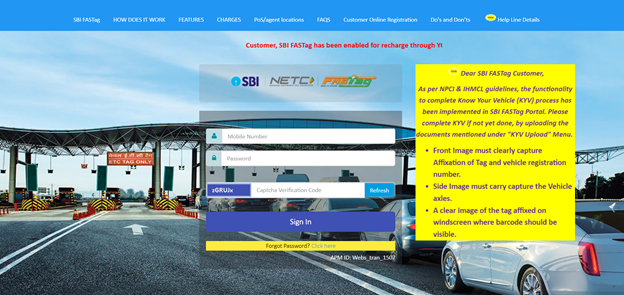
- Your registered mobile number is your login ID. First-time users receive a default password by SMS; if it doesn't arrive, use the Forgot Password link on the login page.
- The portal dashboard shows wallet balance, linked vehicle(s) and statements.
- To recharge, use the portal’s Recharge option or follow the link to YONO / BBPS / UPI. You can also download transaction statements from here.
Method 3: SMS Alerts & Missed Call Service
Let’s look at the steps:
- For Missed call
From your registered mobile, give a missed call to 7208820024. You will then receive an SMS with your updated FASTag balance details.
- For SMS
Open SMS and type FTBAL for a single vehicle. Or type FTBAL <VehicleNumber> if you have multiple tags. Send the SMS from your registered number to 7208820019. You’ll get an instant reply with the balance.
Note: These services work only from the mobile number registered with SBI FASTag.
Method 4: Customer Care Helpline
Let’s look at the steps:
- Keep your FASTag ID, vehicle number and registered mobile handy.
- Call SBI FASTag support numbers for help. For general FASTag queries use 1800 11 0018. For toll plaza complaints, 1033 is the NHAI helpline.
- Ask the representative for balance details or for a transaction statement to be emailed.
Method 5: Email Notifications
Let’s look at the steps:
- SBI sends an SMS each time a toll is deducted and you can download transaction statements from the FASTag portal. If alerts aren't arriving, confirm that your registered mobile number is correct.
- Enable transaction alerts or periodic statements in the portal settings.
- After enabling, you’ll receive toll deductions and balance summaries in your inbox. If you don’t see them, check spam and confirm the email on file with customer support.
Method 6: MyFASTag Mobile Application
Let’s look at the steps:
- Download MyFASTag (IHMCL / NHAI app) from the Play Store or App Store.
- Register using the vehicle number and the mobile linked to your State Bank of India FASTag.
- Once added, the app shows the balance and recent transactions for that vehicle’s tag. You can also compare tags if you manage more than one.
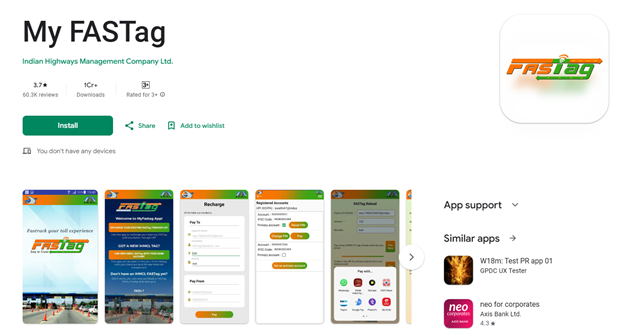
The app also shows your tag's live status: green means active with enough balance, orange means low balance and red means blacklisted. This helps if the toll lane rejects you despite a good balance.
FASTag Update: One Vehicle, One Active Tag Rule
From 1 February 2026, NHAI dropped the Know Your Vehicle (KYV) step for new car, jeep and van FASTags. In return, banks must verify vehicle details on the VAHAN database before activating a tag.
Key Changes:
- Discontinuation of Know Your Vehicle (KYV) Process for New Issuances:
- The KYV process has been removed for new FASTag issuances in the Car/Jeep/Van category.
- Banks are now responsible for verifying vehicle details at the time of activation, eliminating the need for post-issuance KYV checks.
- This change aims to expedite the issuance process and reduce delays for vehicle owners.
- KYV Requirements for Existing FASTags:
- Routine KYV checks are no longer mandatory for existing FASTags issued to cars.
- KYV verification will only be required in specific cases where complaints are received, such as issues related to loose FASTags, incorrect issuance, or misuse.
- Mandatory VAHAN Verification Prior to Activation:
- Vehicle details must now be verified through the VAHAN database before FASTag activation.
- This step ensures accurate vehicle information and reduces the likelihood of disputes or incorrect toll deductions.
- Strict Enforcement of One Vehicle, One FASTag Policy:
- Each vehicle must have only one active FASTag.
- Duplicate or multiple FASTags linked to the same vehicle number will be deactivated to prevent misuse.
- Vehicle owners are advised to close any unused FASTags to avoid transaction failures or unexpected penalties.
- Penalties for Non-Compliance:
- Since 15 November 2025, a vehicle without a valid, functional FASTag pays twice the toll in cash, or 1.25 times if it pays via UPI.
- Repeated violations can lead to additional fines or FASTag suspension.
- Maintaining an active and properly linked FASTag is crucial to avoid such penalties.
Benefits of Using SBI State Bank Of India FASTag
When you travel on the highway, SBI FASTag wants to make sure that the ride is easier by cutting out cash payments at toll booths. Once your tag is linked and active, money is deducted automatically from your wallet. This saves time at plazas and reduces the chance of carrying loose change.
Another plus is tracking. Every toll deduction shows up in your account statement, so you can keep records for personal or business travel. Recharge is also simple since State Bank of India links FASTag with apps, UPI, and online banking.
And if you travel often, the cashback offers and smoother traffic flow make
the tag more than just a convenience. It’s a long-term cost and time saver.
Near non-stop passage, lower fuel use from less idling, and downloadable toll
statements make the tag a long-term time and cost saver.
Have an Annual Pass? You Still Need a Balance Check
Private car owners can activate the FASTag Annual Pass on an existing tag. It costs Rs 3,075 for FY 2026–27 (up from Rs 3,000 from 1 April 2026) and is valid for one year or 200 toll crossings, whichever comes first. It works only at National Highway and Expressway fee plazas. Toll plazas outside that
network still charge your wallet normally, so keep the balance topped up.
Fees and Charges to Check SBI State Bank Of India FASTag Balance
Checking your SBI FASTag balance does not carry any fee. You can log in to the app, use SMS, or give a missed call without paying extra. Purchasing an SBI FASTag carries a one-time issuance fee of Rs. 100 (all vehicle types). For a car, jeep or van, you pay Rs. 100 for the tag, a refundable Rs. 200 security deposit and a Rs. 100 first top-up, Rs. 400 in all. Other vehicle classes pay Rs. 100 + Rs. 300 + Rs. 300 = Rs. 700.
Keep in mind that you can recharge with different amounts based on your travel needs. The minimum balance is the amount you load when the tag is activated. After that, top up regularly so the tag doesn't slip into low-balance status.
Common Issues in SBI State Bank Of India FASTag Balance Check
Some commonly reported issues are that the users face login errors on the portal or app. At times, SMS alerts arrive late or don’t show up if the mobile number is not correctly registered.
There are also cases where the tag shows low balance even after recharge. This usually happens when the payment gateway has not confirmed the top-up yet. Network delays at toll plazas can also cause double deductions, which reflect balance mismatches.
How to Resolve FASTag Balance Issues?
Most balance-related problems clear up by checking the basics. Start with ensuring your mobile number and email are updated on the portal. If a recharge hasn’t reflected, wait a few hours, then confirm the transaction status in your bank or UPI app. If money left your account but never reached the wallet, file a complaint at crh.sbi.bank.in. SBI says such amounts are credited within 15 days.
For SMS or missed call issues, recheck that the number you’re using is the one linked to your FASTag. If you see a wrong deduction at a toll plaza, raise a dispute through the portal or app. Report an incorrect deduction at crh.sbi.bank.in within 40 days of the transaction. SBI then raises a chargeback, which normally takes 20–30 working days. And for
unresolved cases, the customer care helpline remains the fastest route.
Tips for Smooth SBI State Bank Of India FASTag Usage
Keep your wallet balance slightly higher than the minimum to avoid interruptions. Recharging in advance before a long trip reduces the risk of stoppages at tolls.
Install the SBI YONO app on your phone and enable notifications. This way, every deduction or recharge update reaches you instantly. It also helps to download monthly statements if you use FASTag for business travel, so records stay neat.
Ensure your FASTag is properly affixed to the windshield. A tag that isn't fixed on the windscreen,
or is carried in hand, can be hotlisted or blacklisted.
How Your FASTag Connects to Your Car Insurance
FASTag also touches your motor insurance. Under MoRTH's rules, a valid FASTag is required when you buy a new third-party motor policy, and the FASTag ID is recorded on the insurance certificate (Form 51). This has applied since 1 April 2021. So an active tag that is correctly linked to your registration number matters when you insure or renew a car, not just at the toll gate. Keep your FASTag ID and vehicle
details handy at that point, and confirm with your insurer exactly what they need.
SBI State Bank Of India FASTag Customer Support & Contact Details
Here’s a brief overview of SBI FASTag Customer support and Contact details:
|
For balance or recharge issues |
1800 11 0018 (SBI FASTag toll-free) |
|
For toll plaza-specific complaints |
|
|
To write to SBI FASTag support |
helpdesk.fastag@sbi.co.in |
|
To log complaints or track existing requests |
SBI's complaint portal, crh.sbi.bank.in, or the FASTag portal |
Keeping these details handy ensures you can sort out problems quickly and keep your travel smooth.
Summing Up
SBI FASTag makes highway travel smoother, but it only works well if you keep an eye on your balance. The good part is that State Bank of India gives you more than one way to do it through apps, the web portal, SMS and missed calls. Most checks take less than a minute, and recharges reflect quickly too. If you stay on top of your balance and keep your tag active, your drives remain free of unnecessary stops.
Disclaimer: The information provided on this platform is intended for general awareness and educational purposes. While every effort is made to ensure accuracy, some details may change with policy updates, regulatory revisions, or insurer-specific modifications. Readers should verify current terms and conditions directly with relevant insurers or through professional consultation before making any decision.
All views and analyses presented are based on publicly available data, internal research, and other sources considered reliable at the time of writing. These do not constitute professional advice, recommendations, or guarantees of any product’s performance. Readers are encouraged to assess the information independently and seek qualified guidance suited to their individual requirements. Customers are advised to review official sales brochures, policy documents, and disclosures before proceeding with any purchase or commitment.
FAQs
You can check instantly through the SBI FASTag app, SBI FASTag portal, or by giving a missed call from your registered number.
Yes, you can give a missed call to 7208820024 from your registered mobile, and you’ll get an SMS with your balance.
Yes, use the missed call service or send an SMS in the correct format from your registered number.
It is usually done within minutes. In rare cases it may take a few hours depending on the payment method.
You can recharge immediately through the app, UPI, or portal. If balance still shows zero, contact SBI FASTag support. For best results, recharge well before you reach the plaza.
Yes, you can manage several tags under the same account, but each vehicle needs its own tag.
No, checking your balance is free, regardless of the method used.
You can use the MyFASTag app (IHMCL), YONO SBI and UPI/BBPS apps such as Google Pay, PhonePe, Paytm and Amazon Pay.
Maintain enough balance, recharge before long trips, and keep your account details updated.
FASTag issued by SBI is valid for 5 years from the date of issuance.
For a new third-party motor policy, MoRTH requires a valid FASTag and its ID is captured on the certificate.


