


SMC Insurance
Welcome to SMC.
How may I assist you?

Time Remaining to Avail Tax Benefits
(Under section 80C & 80D)
Get 90 Lakh Health Cover at Just ₹2K


Buy Life Insurance Now!

100% Privacy
Zero Spam

Network
30+ Reliable Insurers

Legacy

Highly rated insurance website
4.1/5

 Review Smart
 Save Time
Your vehicle's PUC Details for
PUC Number:
Expiry Date:
Days Remaining:
Your vehicle's PUC Details for
PUC Number:
Expiry Date:
PUC Status:
Your vehicle's PUC Details for
Sorry web couldn't retrieve PUC details for the provided registration number
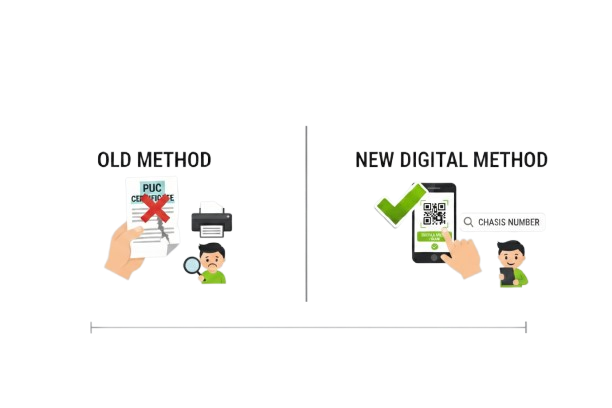
Yes, you can download your PUC certificate even if you lost the original paper copy. Visit the official Parivahan PUC portal, enter your vehicle registration number or chassis number, and download the digital PUC certificate instantly. The digital copy is legally valid across India and accepted by traffic police.
Losing your original PUC certificate can create stress, especially during traffic checks or vehicle document verification. Many vehicle owners assume they must visit a testing centre again or repeat the emission test. In reality, you can download a digital copy online within minutes.
The Government of India maintains a central database of emission test records through the VAHAN system, managed by the Ministry of Road Transport and Highways. Every authorised PUC testing centre uploads your emission test data instantly. This allows vehicle owners to retrieve their certificate anytime using their registration number or chassis number.
This guide explains when you need a digital copy, how to download it using your chassis number, and how to ensure it is valid.
You may need a digital copy in the following situations:
Digital copies stored in official government systems are fully valid.
Yes. Digital PUC certificates are legally valid under Indian motor vehicle regulations.
Traffic police and enforcement officers verify your PUC status using:
You do not need to carry a physical paper copy if the digital version
is available and valid.
Note: Carrying a valid PUC certificate is legally required under Section 190(2) of the Motor Vehicles Act, 1988 (as amended in 2019), with
fines of up to Rs. 10,000 for a first offence.
What is a Chassis Number?
The chassis number, also called Vehicle Identification Number (VIN), is a 17-character alphanumeric code unique to your vehicle. It's like an Aadhaar number for your car or bike.
Where to Find Your Chassis Number
|
Location |
Details |
|
Vehicle RC Book |
Printed on the front page under "Chassis Number" |
|
Vehicle Body |
Embossed on the chassis (under the bonnet for cars, near the engine for bikes) |
|
Insurance Policy |
Listed in vehicle details section |
|
Driver-side Dashboard |
Visible through windshield (cars manufactured post-2010) |
|
Door Frame |
Driver's side door jamb (four-wheelers) |
MA3ERLF1S00C12345
Method 1: Download PUC via Parivahan Portal (Official Method)
Step-by-Step Process
What Information You'll See
The downloaded PUC certificate contains:
Method 2: Vahan e-Challan Mobile App
Why Use the App?
Download and Setup
For Android:
For iOS:
Steps to Retrieve PUC
Pro Tips for App Users
Method 3: DigiLocker Integration (Recommended for 2026)
What is DigiLocker?
DigiLocker is a government cloud storage service linked to your Aadhaar number. Your PUC certificate may appear automatically under “Issued Documents” if your state's RTO/testing centre has integrated with the VAHAN–DigiLocker feed. But this isn't guaranteed for every state or centre. If it doesn't appear, you can manually upload a scanned copy under “Uploaded Documents” as a backup, though a self-uploaded copy won't carry the same auto-verified status as one pulled directly from VAHAN.
How to Access PUC via DigiLocker
First-Time Setup:
Retrieve PUC Certificate:
Link Multiple Vehicles:
Benefits of DigiLocker Method
|
Requirement |
Mandatory |
Where to Find |
|
Vehicle Registration Number |
Yes |
RC book / DigiLocker |
|
Chassis Number (Last 5 digits) |
Alternative option |
RC book / insurance policy |
|
Internet Access |
Yes |
Mobile or computer |
|
Valid PUC Record in VAHAN |
Yes |
Issued by authorised centre |
You can still download the certificate using the chassis number.
The chassis number is unique to every vehicle and remains constant even if the vehicle registration changes.
You can find chassis number on:
You can also access it via:
1. DigiLocker App
2. mParivahan App
Both apps are approved by government authorities.
Normally, PUC certificate appears online:
|
Scenario |
Upload Time |
|
Normal emission test |
Instant to 30 minutes |
|
Network delay |
Up to 24 hours |
|
Fake or invalid centre |
May never appear |
If your certificate does not appear after 24 hours, contact the testing centre.
This may happen due to:
In such cases, you must retest your vehicle at an authorised centre.
|
Vehicle Type |
Initial Validity |
Renewal Validity |
|
New car or bike |
1 year |
Every 6 months |
|
BS6 vehicles (registered after April 1, 2023) |
1 year |
Every 6 months for the first 2 years, then every 12 months thereafter |
|
Commercial vehicles |
1 year |
Every 6 months |
Regular renewal is mandatory.
Keeping a digital copy offers several advantages:
Digital storage prevents compliance issues.
Renew your certificate:
This keeps your vehicle legally compliant.
Avoid these mistakes:
Always verify using official government portal.
If you lose your original PUC certificate, you do not need to panic or repeat the emission test. You can download the digital copy instantly using your registration number or chassis number from the official Parivahan portal. The digital certificate is legally valid and accepted across India.
Always download your certificate from official government sources and store a digital backup on your phone. This helps you avoid fines, ensures compliance, and allows smooth vehicle operation without disruption.
Disclaimer:The information provided on this platform is intended for general awareness and educational purposes. While every effort is made to ensure accuracy, some details may change with policy updates, regulatory revisions, or insurer-specific modifications. Readers should verify current terms and conditions directly with relevant insurers or through professional consultation before making any decision.
All views and analyses presented are based on publicly available data, internal research, and other sources considered reliable at the time of writing. These do not constitute professional advice, recommendations, or guarantees of any product’s performance. Readers are encouraged to assess the information independently and seek qualified guidance suited to their individual requirements. Customers are advised to review official sales brochures, policy documents, and disclosures before proceeding with any purchase or commitment.
Yes. You can download it using the last 5 digits of your chassis number.
Yes. DigiLocker documents are legally valid and accepted nationwide.
No. Retesting is not required if your certificate is still valid in the system.
Yes. Digital copy is accepted during inspections.
You must visit an authorised testing centre and renew it.


SMC Insurance Brokers Pvt. Ltd.
SMC Metro Mall, Near Pratap Nagar Metro Station, Pratap Nagar, New Delhi-110007
Registration No: 289, Registration Code No: IRDAI/DB-272/04/289, Valid till: 27/01/2029, License category: Composite Broker, CIN: U66000DL1995PTC172311
Insurance is the subject matter of solicitation.
Visitors are hereby informed that their information submitted on the website may be shared with insurers.
Product information is authentic and solely based on the information received from the Insurer.

Scan to Download
SMC Insurance App
