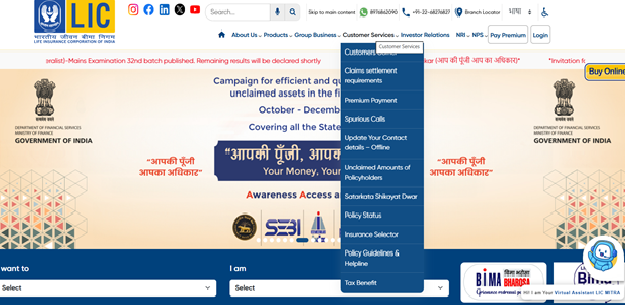
First, visit the official LIC website. On the homepage, you’ll see the option for customer services or the customer portal. Click on that.

Time Remaining to Avail Tax Benefits
(Under section 80C & 80D)
Get 90 Lakh Health Cover at Just ₹2K


Buy Life Insurance Now!
You can check your LIC policy details online using your policy number through the official LIC website, customer portal, mobile app, SMS service, or customer care number. After logging in to the LIC Customer Portal or app, you can view:
If you don’t want to register, you may still check basic policy status using your policy number and date of birth on the LIC website, or by contacting customer care. Keeping track of your LIC policy helps you avoid missed premiums, check bonus additions and plan better for maturity payouts.
Most of us buy an LIC life insurance policy and then forget the details after a while. Premiums get paid, receipts come and go, years pass. Then suddenly you need something. Maybe you want to check the next premium date. Maybe someone asks how much the bonus has built up. Or maybe maturity is getting closer and you want exact numbers.
The good news is this: if you have your policy number, you can check almost everything online. No branch visit. No long wait. And if internet access is patchy, even a simple SMS works. Let’s go step by step and keep it simple.
If you have the policy number, you’re already halfway there. That number is all you need to pull up your details on the LIC website. Here’s what you do:
First, visit the official LIC website. On the homepage, you’ll see the option for customer services or the customer portal. Click on that.
Now, if you’ve already registered, just log in with your user ID and password.
But if this is your first time, you’ll need to register. It’s not complicated. You’ll be asked to enter:
After that, you create your login credentials. That’s it.
Once you’re inside your account, you can see:
Everything shows up in one place. And if you hold more than one policy from LIC, you can link them together under the same login. Makes tracking much easier.
Sometimes you don’t need all the details. You just want to know one thing. Is the policy active? Is any premium pending? In that case, the LIC Customer Portal is the fastest route.
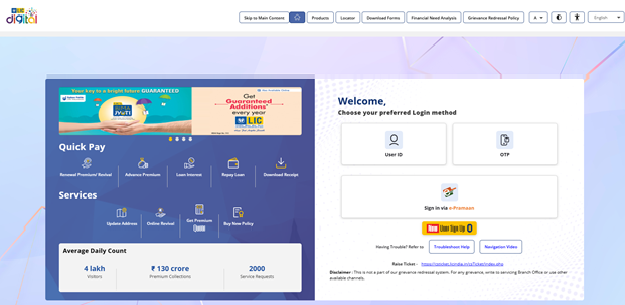
This helps you stay on track. And it’s better to spot an issue early than to find out much later that a policy has lapsed.
Not everyone wants to log in to a website. Sometimes you just want a quick update on your phone. LIC also offers an SMS facility for basic policy information. Before using it, make sure your mobile number is registered with LIC.
Open your messaging app. Type the required keyword along with your policy number in the prescribed format. For example, it may look like:
ASKLIC <Policy Number>
Then send this message to the official LIC service number mentioned on their website. In a short while, you’ll receive a reply with details such as policy status, bonus information, or premium due date.
It’s simple and useful when you don’t have access to the internet.
Not everyone likes logging into portals or typing SMS formats. Sometimes you just want to speak to a real person and get clarity. And that’s perfectly fine. LIC has customer care support that can help you check your policy status using your policy number. Here’s how you can go about it:
It’s simple. And helpful if you prefer direct answers instead of navigating screens.
If you’re someone who manages most things on your phone, the LIC mobile app makes it easier. LIC offers its official mobile application for policyholders. Once set up, checking your details takes just a few taps. Here’s what you need to do:
Sometimes you may not want to create an account right away. Or maybe you just need a quick update. In certain cases, LIC allows policyholders to check basic policy status without full registration. Here’s how you can try this route:
This option works well if you’re in a hurry and don’t want to go through the full sign-up process.
Your policy number is more powerful than most people think. Once you enter it through any of the methods above, you can access several key details. Here’s what you can typically check:
Keeping track of these details helps you avoid missed premiums and last-minute surprises. And if at any stage you want to review your coverage or explore options from other insurers, SMC Insurance can help you compare plans across leading companies. Since we partner with multiple insurers, you can look at choices side by side and decide what works best for you.
At some point, most policyholders get curious. How much bonus has built up? And what will the final payout look like at maturity? You don’t have to guess. You can check these numbers yourself using your policy number. Here’s how:
Some plans show the total maturity value directly. In other cases, you may see the sum assured and bonus separately. Add them together to get a rough idea of what you can expect at the end of the term.
And if you prefer using your phone, the same details are available on the LIC mobile app after login. Checking this once in a while gives you clarity. It also helps if you’re planning future expenses around the maturity date.
If you’ve never logged in before, registration is the first step. It doesn’t take long and once done, you can access your policy anytime. Here’s the process:
Make sure the information matches LIC’s records.
It happens. You can’t find the policy document. The number isn’t saved anywhere. And now you need it. Here’s what you can do:
Many people assume that once a policy is purchased, everything runs smoothly in the background. But that’s not always the case. Here’s why checking your policy status matters:
A quick check once in a while saves trouble later.
An LIC policy usually stays in the background for years. But checking your policy details once in a while makes a real difference. With just your policy number, you can see your premium due date, bonus earned, maturity value and current status. You can do this online, through the mobile app, by SMS, or even by calling customer care.
It doesn’t take long. And it saves you from last-minute stress.
Disclaimer:The information provided on this platform is intended for general awareness and educational purposes. While every effort is made to ensure accuracy, some details may change with policy updates, regulatory revisions, or insurer-specific modifications. Readers should verify current terms and conditions directly with relevant insurers or through professional consultation before making any decision.
All views and analyses presented are based on publicly available data, internal research, and other sources considered reliable at the time of writing. These do not constitute professional advice, recommendations, or guarantees of any product’s performance. Readers are encouraged to assess the information independently and seek qualified guidance suited to their individual requirements. Customers are advised to review official sales brochures, policy documents, and disclosures before proceeding with any purchase or commitment.
(Showing Newest to Oldest)
Simple Process
This is a one-stop destination for all financial solutions, including Life and General Insurance, Equity, Mutual Funds, and more. Everything you need for financial security and growth is available here under one roof.
Secure Future
A true one-stop solution for all your insurance needs. From Life to General Insurance, everything is available here with ease and convenience.
Quick Response
I bought my Term Life Insurance policy through SMC Insurance, and the process was very smooth. They explained everything clearly, compared options, and helped me pick the right plan for my needs. I now feel assured that my family is financially secure.
Log in to the LIC customer portal or mobile app and select your policy. The status will clearly show as active or lapsed. You can also call customer care with your policy number for confirmation.
Yes, as long as you use the official LIC website or mobile app. Avoid sharing your login details with anyone and do not use unknown links.
In some cases, basic status can be checked online by entering your policy number and date of birth. You can also use SMS services or contact customer care if you don’t want to register.
Using your policy number, you can view your policy status, premium due date, bonus accumulated, sum assured, maturity date, loan eligibility, nominee details,etc.
Check old premium receipts, bank statements, or emails from LIC. If you still can’t find it, call customer care or visit the nearest LIC branch with ID proof.
Yes, download the official LIC mobile app, log in or register and select your policy to see details like status, premium history, bonus and maturity information.
You can retrieve it by:
LIC offers WhatsApp services in select cases. If your mobile number is registered, you can send a message to the official LIC WhatsApp number listed on their website and follow the prompts to check policy details.
Log in to the customer portal or app and check the policy status section. If premiums were missed beyond the grace period, it will show as lapsed. You can also confirm this through customer care.
Log in to the LIC customer portal or mobile app and open your policy details. The nominee name is usually listed there. If it’s not visible, you can contact customer care or visit a branch for confirmation.


SMC Insurance Brokers Pvt. Ltd.
SMC Metro Mall, Near Pratap Nagar Metro Station, Pratap Nagar, New Delhi-110007
Registration No: 289, Registration Code No: IRDAI/DB-272/04/289, Valid till: 27/01/2029, License category: Composite Broker, CIN: U66000DL1995PTC172311
Insurance is the subject matter of solicitation.
Visitors are hereby informed that their information submitted on the website may be shared with insurers.
Product information is authentic and solely based on the information received from the Insurer.

Scan to Download
SMC Insurance App







 Life Insurance
 Health Insurance
 Investment
 Car Insurance
 Bike Insurance
 GCV Insurance
 PCV Insurance
 Taxi Insurance


