


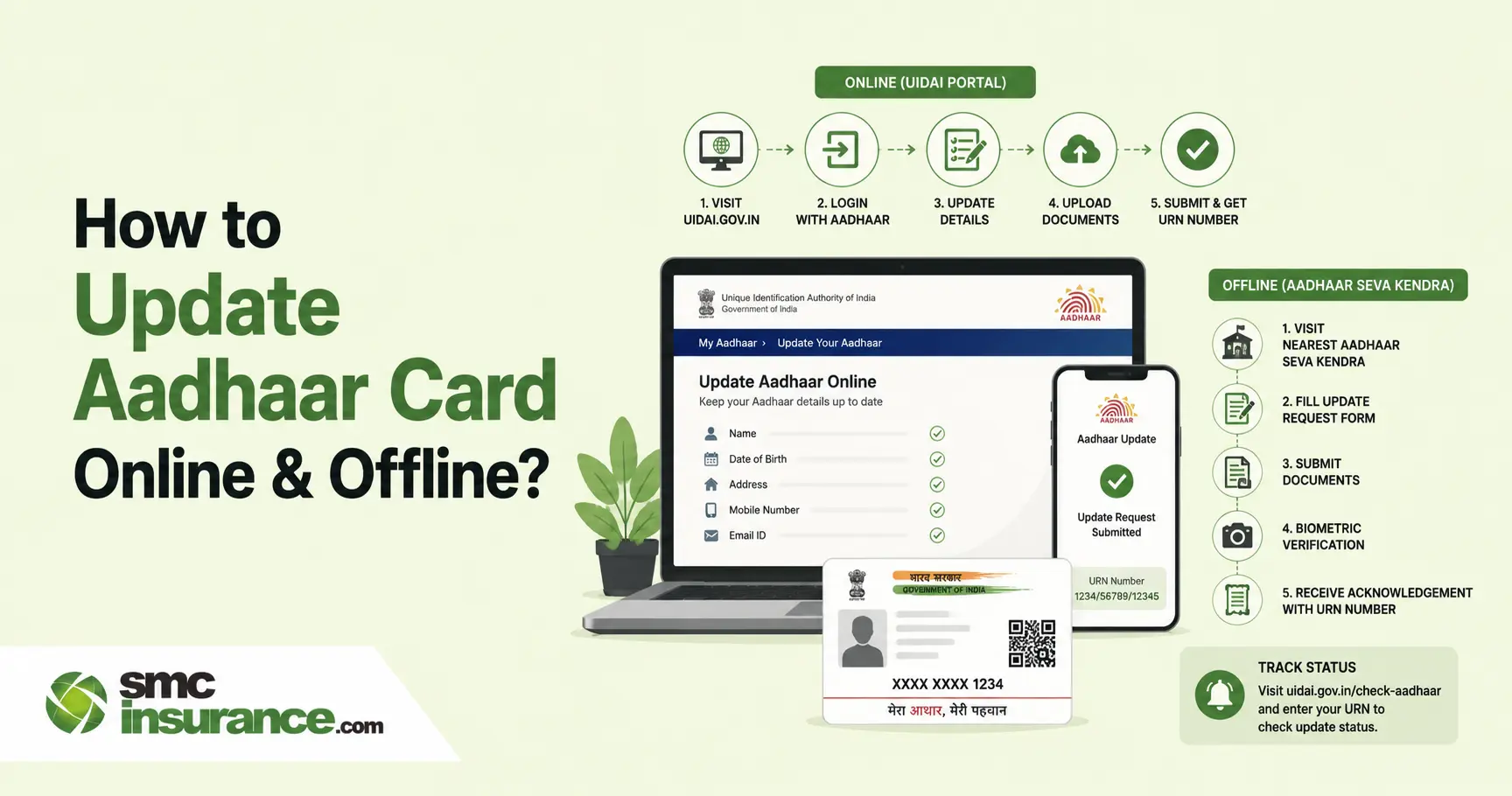
UIDAI lets you update your address and upload fresh identity and address documents on the myAadhaar portal, while the Aadhaar app covers address, mobile number and email. Name, date of birth, gender, photograph, fingerprints and iris scans still need a visit to an Aadhaar centre. A standalone demographic update costs Rs. 75, a biometric update costs Rs. 125 and the demographic part is free when bundled with a biometric update. Online document update is free until 14 June 2027. Name can be changed twice, date of birth and gender once each and a registered mobile number is needed for online services.
Table of Contents
- What Is an Aadhaar Card Update and Why Is It Important?
- Which Aadhaar Details Can You Update Online and Offline?
- How to Update an Aadhaar Card Online Through myAadhaar?
- How to Update an Aadhaar Card Through the Aadhaar App?
- How to Update Aadhaar Offline at an Aadhaar Seva Kendra?
- Documents Required for Aadhaar Card Update Online
- How to Update Aadhaar Documents Online for Free?
- Aadhaar Card Update Fees and Processing Time
- How to Check Aadhaar Update Status
- After Your Aadhaar Update: What to Refresh
- Stay Safe While Updating Aadhaar
- Common Aadhaar Update Problems and How to Fix Them
- Important Tips Before You Apply for an Aadhaar Update
Your new address is on the rent agreement and the bank passbook, yet the Aadhaar in your wallet still shows the flat you left two years ago. A gap like that is enough to stall a KYC check or a subsidy credit and most advice online mixes portal screenshots with half-true claims about what can be changed from home. The reality is that you can update your Aadhaar card online for some details and only at a centre for others, with a different fee and different proof rules attached to each. By the end of this guide you will know which route fits your change, what it costs in 2026 and how to avoid the rejection that costs you a month.
What Is an Aadhaar Card Update and Why Is It Important?
Before you pick a route, it helps to be clear about what an update actually does to your record.
An Aadhaar update is a request to UIDAI to change or refresh what it holds against your 12-digit number, whether that is a demographic detail, a biometric or the documents backing them. Your Aadhaar number itself never changes after an update, so the links to your bank account and government schemes stay intact.
Reasons are mostly mundane. Marriage changes names, a move changes addresses and an operator's typing slip at enrolment can leave a wrong date of birth sitting in the record for years. Fingerprints change too, which is why UIDAI wants a child's biometrics refreshed at 5 and again at 15 and recommends that adults who enrolled after 15 redo theirs every 10 years.
Where it bites is at other counters. Banks, SIM providers and insurers all verify identity against Aadhaar and a name that reads R. K. Srivastava there but Ramesh Kumar Srivastava on your PAN gives them a reason to pause. Insurers must complete the applicable KYC checks when onboarding customers. Aadhaar-based electronic verification can be used for this purpose, subject to the relevant requirements and the customer's consent. Aadhaar authentication for insurance KYC is voluntary; customers should check which other documents their insurer accepts. Learn more about this with our explainer on KYC norms in two-wheeler insurance.
Which Aadhaar Details Can You Update Online and Offline?
UIDAI sorts everything into three buckets and the bucket decides where you have to go.
- Demographic details
Aadhaar's standard demographic update fields include name, date of birth, gender, address, mobile number and email address. Address and mobile number can be updated when necessary, subject to UIDAI's requirements. Name changes are normally limited to two during a person's lifetime, while date of birth and gender can each be changed once, subject to the applicable exception process. - Biometric details
Photographs, fingerprints and iris scans can only be captured at an Aadhaar centre, because a machine has to read your fingers and eyes. UIDAI's own FAQ says there is no limit on photograph updates, so a ten-year-old picture that no longer looks like you is easy to fix. - Identity and address document updates
A document update does not change any detail on your card. It attaches fresh proof of identity and address to the details already on file and UIDAI nudges anyone whose record has sat untouched for 8 to 10 years to do it. If a detail is actually wrong, you need a demographic update instead.
What you want to change |
myAadhaar portal |
Aadhaar app |
Aadhaar centre |
Address | Yes, with proof of address or a family head's consent | Yes | Yes |
Mobile number | No | Yes, if you can verify your old number | Yes, no document needed |
Email address | No | Yes | Yes |
Name | No | No | Yes, twice in a lifetime |
Date of birth | No | No | Yes, once in a lifetime |
Gender | No | No | Yes, once in a lifetime |
Photograph, fingerprints, iris | No | No | Yes |
Identity and address document update | Yes | No | Yes |
Note: Based on UIDAI help pages and announcements reviewed in October 2026. UIDAI adds services to the app in phases, so check what your portal or app dashboard actually shows before planning a trip. A mobile number can never be registered for the first time through the app.
How to Update an Aadhaar Card Online Through myAadhaar?
The portal is the cheapest and quickest route for an address change, provided your mobile number is already registered with Aadhaar.
- Go to myaadhaar.uidai.gov.in, log in with your Aadhaar number and the captcha and enter the OTP sent to your registered mobile.
- Open the address update service and choose the option to update Aadhaar online.
- Check the details on screen, type the new address and upload a scan of your proof of address. Passports and rent or property agreements need images of every relevant page.
- If you have no address proof in your own name, pick the head of family option instead, enter a relative's Aadhaar number and relationship and ask them to approve it.
- Pay the fee, download the acknowledgement and save the Service Request Number (SRN) printed on it, because that number is how you track everything afterwards.
Changed your mind? You can cancel from the Requests section of your myAadhaar dashboard until the request is picked up for processing and the fee comes back within 21 days.
Some news reports from late 2025 suggested that name and date of birth changes were moving online as well. UIDAI's own help pages, revised in September 2026, still send those changes to a centre, so treat a centre visit as the safe route unless your dashboard clearly offers the option.
How to Update an Aadhaar Card Through the Aadhaar App?
The Aadhaar app has become the easiest way to change a mobile number without queuing, though it has limits you should know before downloading it.
Install it only from the official Play Store or App Store links given on UIDAI's website. Registration asks for your Aadhaar number, then SIM selection, then face authentication and finally a six-digit PIN that locks the app. It will not run if developer mode is switched on and it cannot be used outside India.
To change your mobile number, verify the new number by OTP, complete face authentication and pay the prescribed charge. If you log into the app with a number different from the one registered with Aadhaar, you have to verify both numbers. Lost the old number or never registered one? The app cannot help and a centre visit is the only way.
An address change follows a similar path. Go to Services, then Address Update, upload your document, check the preview in English and your local language, authenticate with your face and pay Rs. 75. Without a document in your name, the family member option lets your head of family approve the request from their own app.
UIDAI announced in July 2026 that users could update their email addresses through the Aadhaar app. The authority has waived the applicable fee for this service until 31 December 2026. As app features and official guidance may change, check the Services menu to confirm availability before starting the process.
Name, gender and date of birth are not available in the app and neither are biometrics. UIDAI quotes up to 30 days for mobile and address updates to reflect.
How to Update Aadhaar Offline at an Aadhaar Seva Kendra?
Anything involving your face, fingers, eyes, name, date of birth or gender ends at a counter and some preparation keeps it to a single visit.
- Find a centre on UIDAI's Bhuvan centre locator, filtering for centres that offer updates, or book a slot at a UIDAI-run Aadhaar Seva Kendra on the appointment portal. Seva Kendras open seven days a week, usually from 9:30 AM to 5:30 PM, while bank and post office centres keep their own hours.
- Carry original documents, since the operator scans them and hands them back. You do not have to return to the centre where you first enrolled and the enrolment and update form can be downloaded from UIDAI's site if you want to fill it in beforehand.
- Tell the operator only the fields you want changed. The software marks just those fields and a verifier checks your documents against them.
- Authenticate with your fingerprint or iris, then read the details on the operator's screen. Spelling errors are far easier to fix before you sign off than after.
- Pay the applicable charge and collect the acknowledgement slip, which carries your Update Request Number (URN) or Enrolment ID (EID) and prints the fee at the bottom.
Mobile number changes are the easy case here, because UIDAI does not ask for any document or for your old number at a centre.
Documents Required for Aadhaar Card Update Online
Documents are where online requests tend to come unstuck, so this part deserves a careful read.
UIDAI accepts only the proofs on its List of Supporting Documents. A proof of identity must carry your name and photograph and passports, driving licences and voter ID cards sit on that list. A proof of address must show your name and address and bank statements, utility bills and rent or property agreements are among the usual choices. A date of birth change needs proof of birth such as a birth certificate.
For an online address request, UIDAI says four things decide acceptance. The document must be on the valid list, it must be in your name, the address you type must match the address on it and the upload must be a clear coloured scan of the original. Small additions like a house number or a corrected pin code are allowed, but anything that changes the base address needs a different proof.
Names follow their own rules. UIDAI wants the full name with no titles like Mr or Dr and with initials expanded, so if two of your documents differ, the full version is what gets recorded. A surname change needs a listed proof of identity showing the same address as your Aadhaar and any change after your two allowed ones needs a gazette notification.
How to Update Aadhaar Documents Online for Free?
This is the one service UIDAI has made free and the window now runs well into 2027.
UIDAI extended the fee waiver for online document update by another year, so it now covers 15 June 2026 to 14 June 2027. The waiver applies only on the myAadhaar portal and the same document update at a centre still costs Rs. 75. It suits anyone whose Aadhaar is around ten years old and whose details have not changed since.
- Log in at myaadhaar.uidai.gov.in with your Aadhaar number and OTP, then choose Document Update.
- Compare the name, date of birth, gender and address shown with your actual documents.
- Upload your proof of identity first and your proof of address next, tick the consent box and submit.
- Note the request number and track it on the status page.
A free document update cannot fix a wrong spelling or an outdated address. It only strengthens the record you already have, so if the details are wrong, go for an address or demographic update and pay the fee.
Aadhaar Card Update Fees and Processing Time
Costs are simple once you separate the three kinds of update.
Service |
Where |
Fee |
Standalone demographic update (name, address, date of birth, gender, mobile number or email) | Aadhaar centre; supported fields through the app or portal | Rs. 75, subject to the applicable service-specific fee waiver. |
Demographic update done together with a biometric update | Centre | Free |
Biometric update (photograph, fingerprints, iris) | Centre | Rs. 125 |
Mandatory biometric update at ages 5 to 7 and 15 to 17 | Centre | Free |
Document update | myAadhaar portal | Free until 14 June 2027 |
Document update | Centre | Rs. 75 |
Email add or update | Aadhaar app | Free until 31 December 2026 |
Note: Based on UIDAI's published fee schedule and announcements as of October 2026. Some older UIDAI help pages still show figures like Rs. 50 for an online address update, so the amount displayed at payment and printed on your acknowledgement is the one that applies. Children aged 7 to 15 can currently receive the applicable mandatory biometric update without charge under UIDAI's extended waiver, which runs until 30 September 2027. Check UIDAI's latest fee guidelines before visiting an Aadhaar centre.
If you need to update both your biometric information and demographic details, check whether the two services can be processed together. UIDAI waives the separate demographic update fee when an eligible biometric update and demographic update are completed together. However, mandatory biometric updates must be processed as standalone transactions and cannot be combined with another update in the same transaction. Charges are the same at every centre in the country, including Seva Kendras, so anyone asking for more than the slip shows is overcharging.
On timing, UIDAI says roughly 90 percent of update requests are completed within 30 days and its help pages quote a range of 30 to 90 days depending on the type of update and the verification involved. Some requests are routed to state authorities for checking. Updated Aadhaar letters are printed within 10 days of the update and handed to the postal department, except for mobile and email changes, which get only an SMS or email notification. Submitting a request does not guarantee approval, because every update is validated before it is accepted.
How to Check Aadhaar Update Status
Once the request is in, the waiting is easier if you know where to look.
Open the Check Enrolment and Update Status page on myAadhaar and enter the number from your acknowledgement. Online and app requests give you an SRN, a centre slip carries a URN or EID and requests you placed online also appear under Requests in your dashboard. The Aadhaar app has a Track my request option and the toll-free helpline 1947 can read the status out if you have your number handy.
Before you apply for a name, date of birth or gender change, it also pays to open the Aadhaar Update History option on myAadhaar after logging in with your OTP. It lists the updates already made on your number, which tells you how many of your lifetime changes are left and it spares you from burning one on a spelling fix when you had already used it.
If a request is pending beyond 30 days, file a complaint on the grievance portal with your EID, URN or SRN, or write to help@uidai.gov.in.
After Your Aadhaar Update: What to Refresh
Getting the update approved is only half the job, because the old data lives on in other places.
Download your e-Aadhaar from myAadhaar as soon as the status turns successful, since it carries the same validity as the original letter. If your phone or email changed, use UIDAI's verified email or mobile page to confirm the new one is linked, because OTPs will now go there.
Then chase the paper trail. Banks, your mobile operator and any lender that holds your Aadhaar-based KYC should see the new address or name and if your name changed, PAN and bank records need to follow so that linking checks do not throw a mismatch. The same goes for insurance. Aadhaar is one of the quickest KYC routes for policies and our list of KYC documents required to buy bike insurance shows why a clean, current Aadhaar saves time at purchase or renewal.
Stay Safe While Updating Aadhaar
Fraud around Aadhaar services is common enough that a few habits are worth building before you start.
Use Official UIDAI Sites Only and Never Share Your OTP
Stick to myaadhaar.uidai.gov.in, uidai.gov.in and the Aadhaar app from the official stores. The OTP for any update goes to your own registered mobile and the only places you should type it are those official pages or the app. Nobody who calls to help you with your Aadhaar needs it.
At a centre, UIDAI instructs operators not to link their own mobile number to an applicant's Aadhaar and to let you enter your own. If someone offers to use theirs for convenience, walk away, because that number would then receive every future OTP. A single mobile number can be linked to at most nine Aadhaar numbers, so check that yours is not tied up with someone else's.
Keep the acknowledgement slip and compare the amount you pay with the charge printed on it. UIDAI has publicly warned residents to check charges before availing a service and overcharging can be reported on 1947.
Common Aadhaar Update Problems and How to Fix Them
Most of these have a clear fix, as long as you know which problem you are actually facing.
- The documents do not match the details you entered, or the information itself has discrepancies.
- The document is not on UIDAI's valid list, or it is not in your name.
- The upload is blurry, cropped or in black and white instead of a clear coloured scan.
- The operator made an error while entering the data.
- You have already used up the permitted number of changes for name, date of birth or gender.
- The request did not comply with a UIDAI policy rule.
If the limit is the problem, the standard route is closed, but UIDAI can approve an exception through its regional office when you give a proper reason and documents. For a name, that usually means a gazette notification along with an old proof of identity, a marriage certificate or a divorce decree. For gender, it means a medical certificate or a transgender identity card. Call 1947 or write to help@uidai.gov.in with your EID to start the process.
No OTP arriving almost always means your mobile number is not registered with Aadhaar and the fix is a centre visit. The same applies if you have lost the old number, since the portal cannot change it. Short of an address proof in your own name, use the head of family option rather than waiting for a document you may never get.
Rejected online requests are not refunded, so read the reason in the status page, correct the document and reapply. If you believe the rejection is wrong, file a complaint on the grievance portal or call 1947.
Important Tips Before You Apply for an Aadhaar Update
A few minutes of checking beforehand can save a month of waiting.
- Look at your Aadhaar Update History first, so you know how many names, date of birth and gender changes remain.
- Fix every error in one request, because a spelling correction counts as one of your two name changes.
- Match the new details to your PAN and bank records before you submit, so you are not creating a fresh mismatch.
- Update your mobile number first if it is missing or dead, since every online route depends on it.
- If you need both demographic and biometric updates, check whether they qualify for combined processing before visiting the centre. Mandatory biometric updates must be handled separately.
- Photograph the acknowledgement and save the SRN, URN or EID somewhere you can find it in a month.
- Do not leave the free document update for the last week of the window, because a rejection can eat the time you had left.
Summing Up,
Updating Aadhaar is less about effort and more about picking the right door. Address and documents can go through the myAadhaar portal, mobile, address and email through the Aadhaar app and everything tied to your name, birth date, gender or biometrics through a centre. Costs stay modest at Rs. 75 for most demographic changes and Rs. 125 for biometrics, with online document update free until 14 June 2027. The real expense is a rejected request, which usually comes down to a mismatched document, a blurry scan or a limit already used. Check your update history, keep originals ready and save the acknowledgement number the moment you receive it. Then track the status, give UIDAI its 30 days and raise a grievance if the clock runs out. Do it before you need it, because a KYC check or a policy renewal is the wrong day to discover your Aadhaar is out of date.
Disclaimer: The information provided on this platform is intended for general awareness and educational purposes. While every effort is made to ensure accuracy, some details may change with policy updates, regulatory revisions, or insurer-specific modifications. Readers should verify current terms and conditions directly with relevant insurers or through professional consultation before making any decision.
All views and analyses presented are based on publicly available data, internal research and other sources considered reliable at the time of writing. These do not constitute professional advice, recommendations, or guarantees of any product’s performance. Readers are encouraged to assess the information independently and seek qualified guidance suited to their individual requirements. Customers are advised to review official sales brochures, policy documents and disclosures before proceeding with any purchase or commitment.
FAQs
Yes, but only for some details. On the myAadhaar portal you can update your address and upload identity and address documents and the Aadhaar app lets you change your address, mobile number and email. Name, date of birth, gender, photograph, fingerprints and iris scans still need an Aadhaar centre. Every online route needs a mobile number that is already registered with Aadhaar, because the OTP goes there.
Log in to myAadhaar with your Aadhaar number and OTP, choose the address update service, enter the new address and upload a valid proof of address in your name. Without such a document, the head of family option lets a relative at the same address approve the change. Pay the fee shown, which is Rs. 75 under UIDAI's current schedule and save the SRN from the acknowledgement. The Aadhaar app offers the same change with face authentication.
No, UIDAI's help pages state that mobile number updates are not permitted through the portal. You can change it in the Aadhaar app if you can still verify your old number by OTP, or at any Aadhaar centre, where no document and no old number is needed. If you never registered a number, a centre visit is compulsory because the app cannot register one for the first time. Until that is done, OTP-based online services stay out of reach.
You need a proof of identity carrying your name and photograph, such as a passport or voter ID and a proof of address in your name, such as a bank statement, utility bill or rent agreement, all from UIDAI's supporting documents list. A date of birth change needs proof of birth like a birth certificate. Centres need originals, while the portal needs clear coloured scans. A name change beyond your two allowed ones needs a gazette notification.
A standalone demographic update costs Rs. 75 and a biometric update costs Rs. 125, with the demographic part free when done together with a biometric update. Online document update on myAadhaar is free until 14 June 2027, while the same service at a centre costs Rs. 75. Email updates through the Aadhaar app are free until 31 December 2026. Aadhaar enrolment is free. The prescribed mandatory biometric updates are also free for eligible children aged 5 to 7 and 15 to 17. UIDAI has additionally extended the applicable fee waiver for children aged 7 to 15 until 30 September 2027.
UIDAI allows two changes to your name and one each to your date of birth and gender. Address and mobile number have no cap as long as you provide valid proof. Once a limit is used up, only an exception approved through a UIDAI regional office can help and it needs a solid reason such as a gazette notification, court order or medical certificate. Calling 1947 with your EID is the way to start.
UIDAI says about 90 percent of update requests are completed within 30 days and its help pages quote 30 to 90 days depending on the update and the verification involved. Mobile and address changes made through the app can take up to 30 days to show. The updated letter reaches you by post, except for mobile and email changes. If the request is still pending after 30 days, file a complaint using your EID, URN or SRN.
Open the status page to see the outcome, then match the likely cause against the usual culprits, such as a document that does not match your details, a poor scan or an exhausted limit. Correct the problem and submit a fresh request with the right document, remembering that rejected online requests are not refunded. If you think the rejection is wrong, file a complaint on the grievance portal, email help@uidai.gov.in or call 1947.


